


Spartime: beveilig uw toegangen offline, met tijdelijke codes en QR-codes
Spartime ontwerpt sinds 2002 toegangsoplossingen en vervangt sleutels en badges door gepersonaliseerde tijdelijke toegangen. Het bijzondere eraan: de FacilitAcces®-deurcontrollers werken zonder internetverbinding op de uitgeruste locatie.
Voorstelling
Spartime Innovations ontwerpt en ontwikkelt sinds 2002 toegangsoplossingen en beheert vandaag meer dan een miljoen toegangen per jaar. De belofte: sleutels en badges vervangen door tijdelijke, gepersonaliseerde en beveiligde toegangen, zonder dat iemand zich moet verplaatsen om een deur te openen.
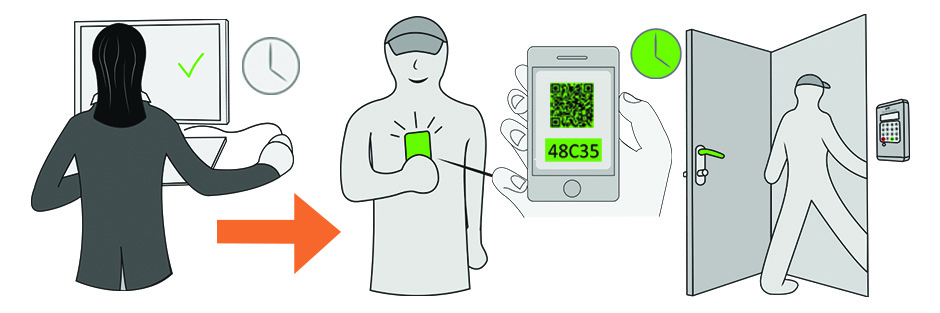
Het bijzondere schuilt in de autonomie van de FacilitAcces®-deurcontrollers. Waar andere oplossingen een permanente verbinding tussen de organisatie en de apparatuur nodig hebben, berekent Spartime Persocode®-codes die geldig zijn binnen een bepaalde tijdspanne, en de deurcontroller controleert ze zelf. Er is geen enkele internetverbinding nodig op de uitgeruste locatie.
Wat de oplossing dagelijks oplevert
- Geen sleutelbos meer om te beheren: het toegangsrecht wordt vanzelf aangemaakt en ingetrokken, enkel door het lezen van de code.
- Een lichte installatie, zonder netwerkbekabeling of internetconfiguratie ter plaatse.
- Een volledig beheer op afstand, vanuit uw organisatieaccount en vanaf het Spartime-platform.
- Elke boeking levert een andere code op, en de gebeurtenissen worden in de deurcontroller bewaard, met mogelijkheden tot waarschuwingen.
- De compatibele deurcontrollers aanvaarden ook QR-codes, handig om aan een occasionele speler te bezorgen.
- Dezelfde installatie kan naast de deur ook de verlichting en de verwarming van het terrein aansturen.
Het volledige traject van de speler openen
Eén en dezelfde boeking kan meerdere opeenvolgende doorgangen openen: de hoofdpoort, het clubhuis, de kleedkamers en vervolgens de deur van de court. De speler voert één enkele code in en volgt zijn weg tot aan het terrein, zonder een combinatie per deur te moeten onthouden.
Elk van deze toegangen wordt volgens twee logica's ingesteld, naar keuze: een vast tijdvenster — bijvoorbeeld van maandag tot vrijdag van 8 u tot 22 u — of een opening die afhangt van een lopende boeking.
Een deurcontroller kan ook een kluis of een locker aansturen, om materiaal ter beschikking te stellen met dezelfde code als die van de boeking.
Toepassingen die verder gaan dan de organisatie
Een afgelegen terrein, een locatie zonder netwerk of een installatie waar het trekken van een verbinding duur zou uitvallen: dat is de situatie waarin de autonomie van de deurcontroller het verschil maakt.
Dezelfde apparatuur vindt u zowel in sportzalen en verenigingen als in kantoren, coworkingruimtes, parkings of infrastructuur die door een lokaal bestuur wordt beheerd. Dat is een argument om te overwegen als uw structuur meerdere soorten ruimtes met één enkel hulpmiddel beheert.
Uw Spartime-account koppelen
- Open Administratie›Instellingen›Toegangscontrole & beheer en vervolgens Meer informatie op de Spartime-fiche.
- Activeer de module.
- Vul uw Spartime ID en uw Spartime-wachtwoord in en klik daarna op Verbinding.
Het blok Status van de gateway bevestigt de koppeling. Deze inloggegevens krijgt u van Spartime: het zijn niet die van uw organisatieaccount.

Uw deurcontrollers aanmelden
Een deurcontroller komt overeen met een fysiek toegangspunt: de deur van een court, een kleedkamer, een toegangspoort. Klik vanuit Configuratie van de portiers op Nieuwe portier.
- Vink Portier geactiveerd aan.
- Geef hem een duidelijk Toegang naam, bijvoorbeeld "Court nr. 1 - Zuiddeur" of "Kleedkamers".
- Kies de Kalender / Toegangstype: dat is wat de deurcontroller verbindt met de boekingen van een bepaald terrein.
- Vink Met QR Code aan als uw deurcontroller compatibel is.
- Vul de technische parameters in die Spartime voor deze apparatuur heeft bezorgd.
Meerdere deuren openen met één enkele code
Een speler die een court boekt, moet vaak meerdere deuren passeren: de poort, dan de kleedkamer, dan de court. In plaats van hem drie codes te geven, duidt u een Hoofdportier aan en koppelt u er Secundaire portiers (optioneel) aan.
De code die bij de boeking wordt afgeleverd, opent dan het volledige traject.
Controleren vóór de opening voor het publiek
Met het tabblad Status & testcodes van een deurcontroller kunt u de installatie controleren voordat u ze aan de spelers toevertrouwt: genereer een code en test die ter plaatse.
Test de twee soorten codes die de oplossing aanbiedt, de Uurcodes die op een tijdvenster zijn afgestemd en de Directe codes, voordat u de nieuwe werkwijze aan uw gebruikers aankondigt.
De verlichting en de verwarming aansturen
Dezelfde installatie kan naast de deur ook de verlichting en de verwarming van het terrein aansturen.
De activering is gekoppeld aan de toegangscode: het licht gaat aan wanneer een speler die op de boeking staat zijn code invoert. Er wordt niets geactiveerd als er niemand komt, waardoor u geen court verlicht dat een speler heeft geboekt en vervolgens vergeten is — op de tijdvensters aan het einde van de dag zit daar de grootste besparing.
Contact
Spartime Innovations bestudeert elke installatie voordat het een configuratie voorstelt, en biedt online ondersteuning voor zijn deurcontrollers.
- Website: spartime.com
- E-mail: contact@spartime.com
- Telefoon: 02 51 11 02 40, of +33 2 51 11 02 40 vanuit het buitenland
- Adres: Le Carré de Couëron, 5 rue des Vignerons, 44220 Couëron, Frankrijk
