



Confermare il carrello e seguire i propri ordini
Verifichi il carrello, scelga un metodo di pagamento tra quelli proposti dall'organizzazione, poi segua i suoi ordini e scarichi le fatture.
Sommario
Confermare il carrello
- Vada in Il mio account›Il mio carrello. Se il carrello contiene almeno un articolo, può accedervi dall'icona del menu principale.
- Modifichi la quantità di ogni articolo oppure lo elimini, se necessario.
- Se dispone di un Codice promozionale, lo inserisca e clicchi su Applicare: lo sconto viene mostrato nei totali.
- Clicchi su Continua per passare alla pagina dell'ordine.

Scegliere il metodo di pagamento
Nella pagina dell'ordine, verifichi l'indirizzo di fatturazione e il riepilogo, poi scelga un metodo di pagamento. I metodi proposti dipendono dall'organizzazione:
- Pagamento online: pagamento immediato con carta di credito tramite il fornitore di pagamento dell'organizzazione.
- Pagamento in loco: l'ordine resta in attesa fino alla sua visita alla reception dell'organizzazione.
- Pagamento con assegno: l'ordine viene elaborato al ricevimento del suo assegno per posta oppure alla sua visita alla reception dell'organizzazione.
- Pagamento tramite bonifico bancario: l'ordine viene elaborato dall'organizzazione al ricevimento del bonifico; le coordinate bancarie sono visualizzate a schermo.
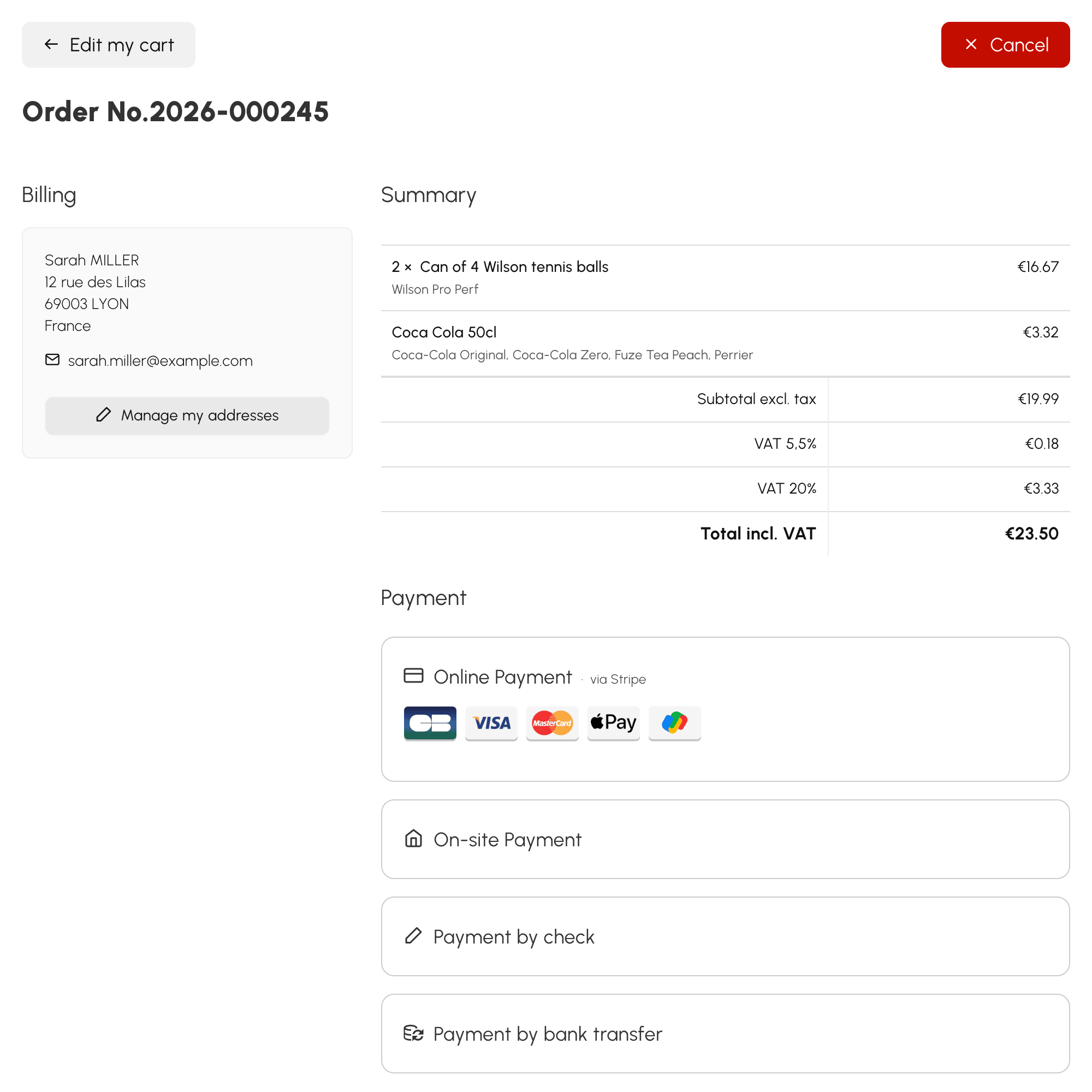
Per un assegno o un bonifico, riporti sempre il riferimento dell'ordine visualizzato a schermo: consente all'organizzazione di identificare il suo pagamento. Può scaricare il buono d'ordine che lo riepiloga.
Dopo un pagamento online, la pagina mostra lo stato in tempo reale: una volta convalidato il pagamento, il suo ordine è confermato e la fattura è disponibile con Scarica la fattura.
Se annulla il pagamento online, non viene effettuato alcun addebito: può riprovare oppure scegliere un altro metodo di pagamento.
Pagare a rate
Se l'organizzazione propone il pagamento a rate per il suo ordine, la pagina dell'ordine le chiede in quante rate desidera pagare.
- Scelga Contante oppure una formula a rate: la prima rata viene addebitata immediatamente.
- Le rate successive sono dettagliate nel Programma dell'ordine, con la relativa data e il relativo importo. Riceverà un'e-mail di notifica in occasione delle rate successive.
- Per pagare una rata, apra l'ordine e clicchi su Paga la prossima scadenza.
Seguire i propri ordini e scaricare i documenti
- Vada in Il mio account›I miei ordini.
- Filtri per tipo con le schede Preventivo, Ordini e Fatture.
- Clicchi su una riga per aprire il dettaglio: stato, importi, transazioni ed eventuale importo residuo da pagare.
- Clicchi sul pulsante con il nome del documento — Fattura, Ordine d'acquisto o Preventivo — per scaricarlo in formato PDF.

L'organizzazione può inviarle un preventivo: lo trova nei suoi ordini, lo apra e scelga un metodo di pagamento per accettarlo.
