



Uzaicināt personu ārpus organizācijas
Ļaujiet spēlēt tuviniekam vai draugam, kurš nav reģistrēts organizācijā. Pievienojiet viņu kā viesi rezervācijas brīdī, ievērojot jūsu organizācijas noteiktos noteikumus. Ja organizācija to atļauj, jūsu viesis var arī pats samaksāt savu daļu, izmantojot saiti.
Pievienot viesi rezervācijai
Personu ārpus organizācijas var uzaicināt divos veidos. Tas atkarīgs no tā, vai spēlējat tikai ar saviem viesiem vai arī ar citiem organizācijas lietotājiem.
Spēlēt ar saviem viesiem
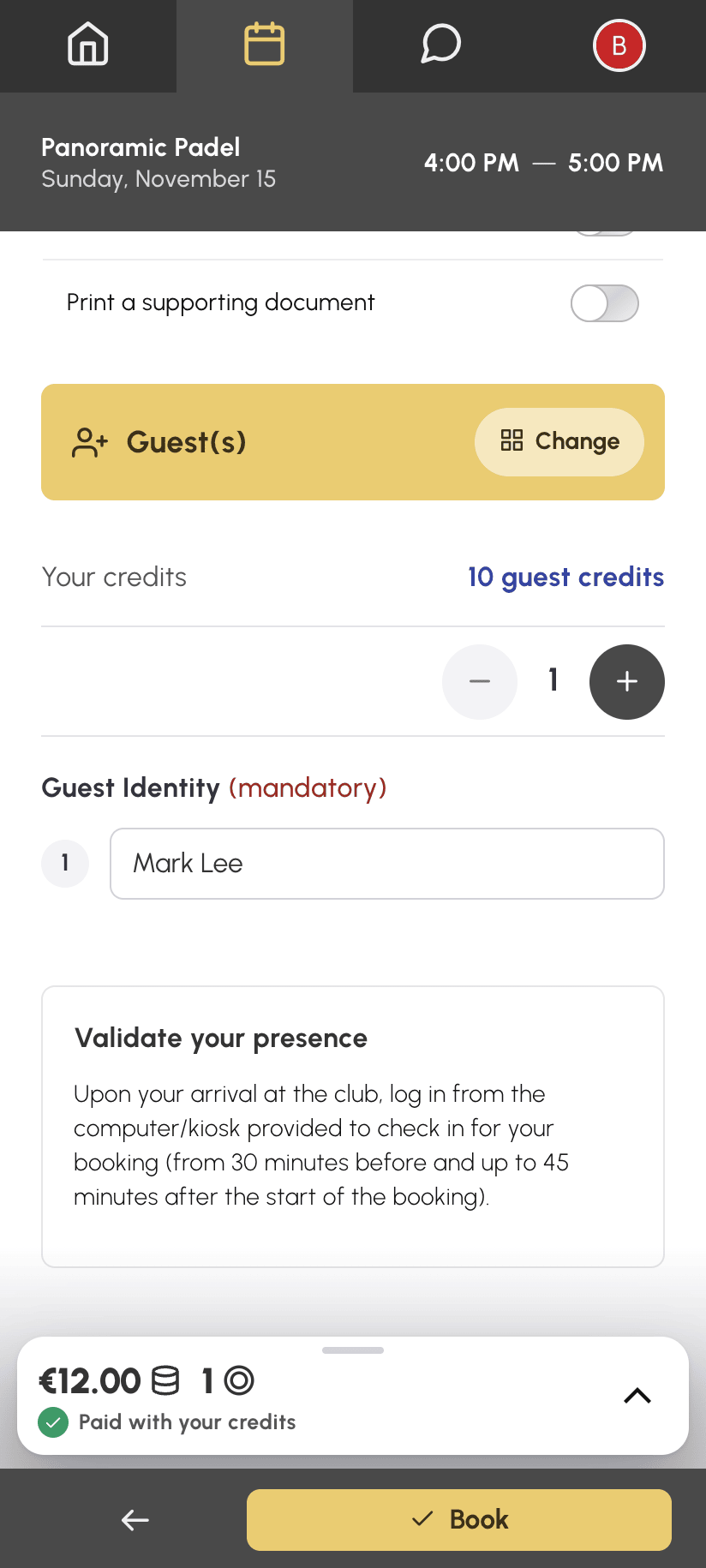
- Noklikšķiniet uz brīva laika posma, lai atvērtu rezervācijas veidlapu.
- Izvēlieties Viesis(i).
- Atlasiet uzaicināto personu skaitu.
- Ja tiek prasīts, norādiet viesu personas datus: atkarībā no jūsu organizācijas konfigurācijas tie ir neobligāti vai obligāti.
- Apstipriniet ar Rezervēt.
Spēlēt ar partneriem un viesiem
- Atveriet rezervācijas veidlapu un izvēlieties Ar partneri.
- Atzīmējiet savus partnerus lietotāju sarakstā.
- Saraksta augšā parādās rinda Viesis(i): atzīmējiet to.
- Atlasiet uzaicināto personu skaitu un, ja tiek prasīts, norādiet viņu personas datus.
- Apstipriniet ar Rezervēt.
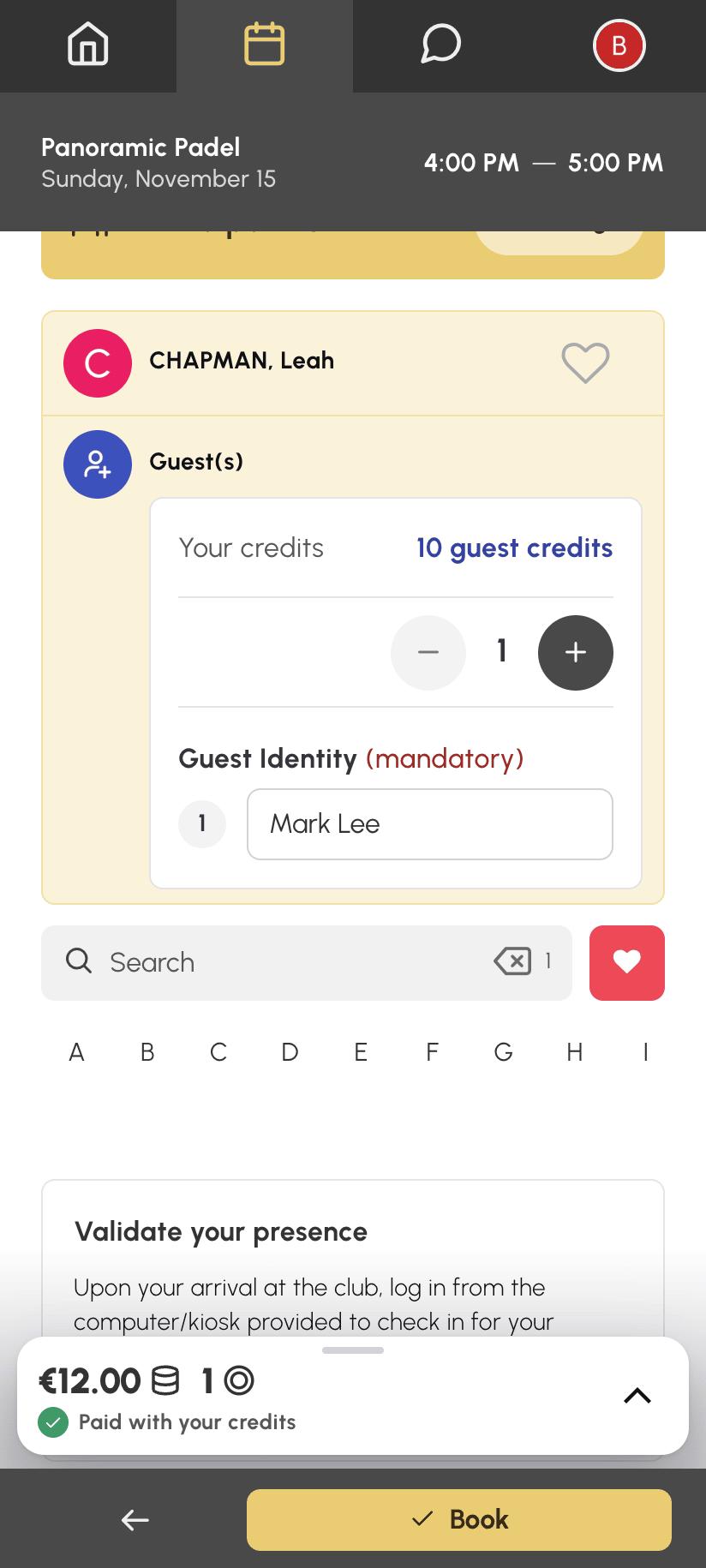
Dažas organizācijas nepiedāvā atsevišķu izvēli Viesis(i): tad viesu rinda vienmēr tiek rādīta saraksta Ar partneri augšā.
Izprast ielūguma izmaksas
Atkarībā no jūsu organizācijas konfigurācijas ielūgumi var būt maksas:
- tie tiek norakstīti no ielūgumu kredītu atlikuma, kas ir atsevišķs no jūsu rezervācijas kredītiem;
- dažas organizācijas tā vietā tieši noraksta jūsu rezervācijas kredītus;
- cena var atšķirties atkarībā no kalendāra, dienas vai laika posma stundas.
Atlikums tiek parādīts veidlapā rezervācijas brīdī, un lodziņā Rezervācijas izmaksas ir detalizēti norādīts, kas tiks norakstīts. Atkarībā no konfigurācijas par viesiem maksā tikai rezervācijas īpašnieks, vai arī katram dalībniekam tiek norakstīti visi rezervācijas ielūgumi. Piemēram, Nicolas un Léa spēlē ar viesi, kura ielūgums maksā 5 €: ja maksā tikai rezervācijas īpašnieks, Nicolas maksā 5 €; pretējā gadījumā Nicolas un Léa katrs maksā 5 €.
Ja jūsu abonements to atļauj, rezervējot varat samaksāt arī par savu partneru ielūgumiem: piemērā Nicolas tad maksātu 10 €, bet Léa — neko.
Iegūt ielūgumu kredītus
Ja organizācija ir aktivizējusi šo funkciju, rezervācijas veidlapā ir pieejama poga Pirkt kredītus; pretējā gadījumā sazinieties ar organizāciju, lai iegūtu papildu kredītus.
Jūsu organizācija var arī ļaut rezervēšanas brīdī samaksāt par trūkstošajiem ielūgumu kredītiem: tie ir iekļauti summā, kas redzama uz pogas Rezervēt.
Ļaut viesim samaksāt savu daļu
Ja jūsu organizācija to atļauj, katrs viesis var pats samaksāt par savu vietu: viņš samaksā savu daļu tiešsaistē, izmantojot saiti, neveidojot kontu, un saņem rēķinu uz sava vārda.
Šī izvēle parādās, ja par rezervācijas ielūgumiem maksājat tikai jūs: jūs spēlējat tikai ar saviem viesiem, vai jūsu organizācija iekasē maksu par ielūgumiem tikai no rezervācijas īpašnieka. Tā neparādās, ja maksājat par savu partneru ielūgumiem, kā arī atkārtotai rezervācijai.
- Pievienojiet viesus rezervācijas veidlapā kā parasti.
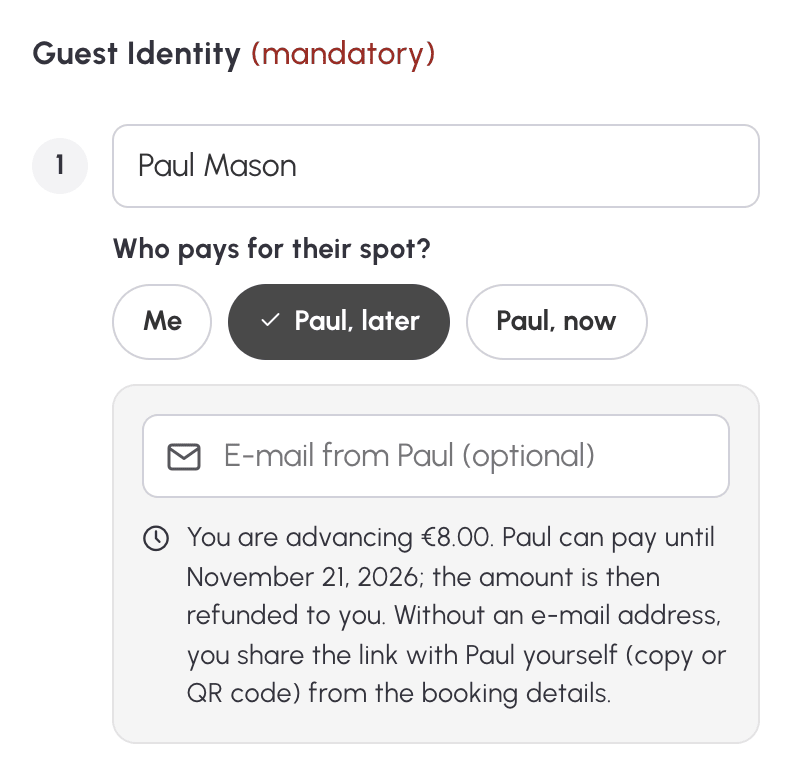
- Ievadiet katra viesa, kurš maksās pats, vārdu un uzvārdu: šajā gadījumā tie ir obligāti.
- Zem viesa vārda sadaļā Kas maksā par savu vietu? atstājiet izvēli Es, lai par viesi samaksātu jūs, vai izvēlieties vienu no divām pogām ar viesa vārdu: „vēlāk” vai „tagad”. Ja viesa daļa ir pārāk maza tiešsaistes maksājumam, viesim tiek piedāvāta tikai izvēle Es.
- Ievadiet viesa e-pasta adresi, lai viņš saņemtu saiti. Tā nav obligāta: ja tās nav, saiti viesim nodosiet jūs.
- Pārbaudiet lodziņu Rezervācijas izmaksas, kurā katram viesim ir sava rinda, pēc tam noklikšķiniet uz Rezervēt.
Kad rezervācija ir veikta, atveras tās informācija: tur redzama katra viesa rinda un saite.
Segt viesa daļu avansā: „vēlāk”
Izvēloties „vēlāk”, rezervācija tiek apstiprināta uzreiz. Jūs avansā sedzat viesa daļu ar saviem kredītiem, tāpat kā parastam ielūgumam, un viesim ir laiks līdz 7 dienām pēc laika posma beigām, lai to samaksātu. Tiklīdz viesis samaksā, avansā izlietotie kredīti jums tiek atgriezti, atkarībā no jūsu paziņojumu iestatījumiem jūs saņemat e-pasta paziņojumu, un jūsu kredītu vēsturē ir norādīts, kas samaksāja.
Piemēram, Nicolas rezervē padel kortu ar savu draugu Paul, kura ielūgums maksā 8 €. No Nicolas tiek norakstīta maksa par viņa vietu un 8 € par ielūgumu; kad Paul tiešsaistē samaksā savus 8 €, Nicolas atgūst savus 8 € kredītos.
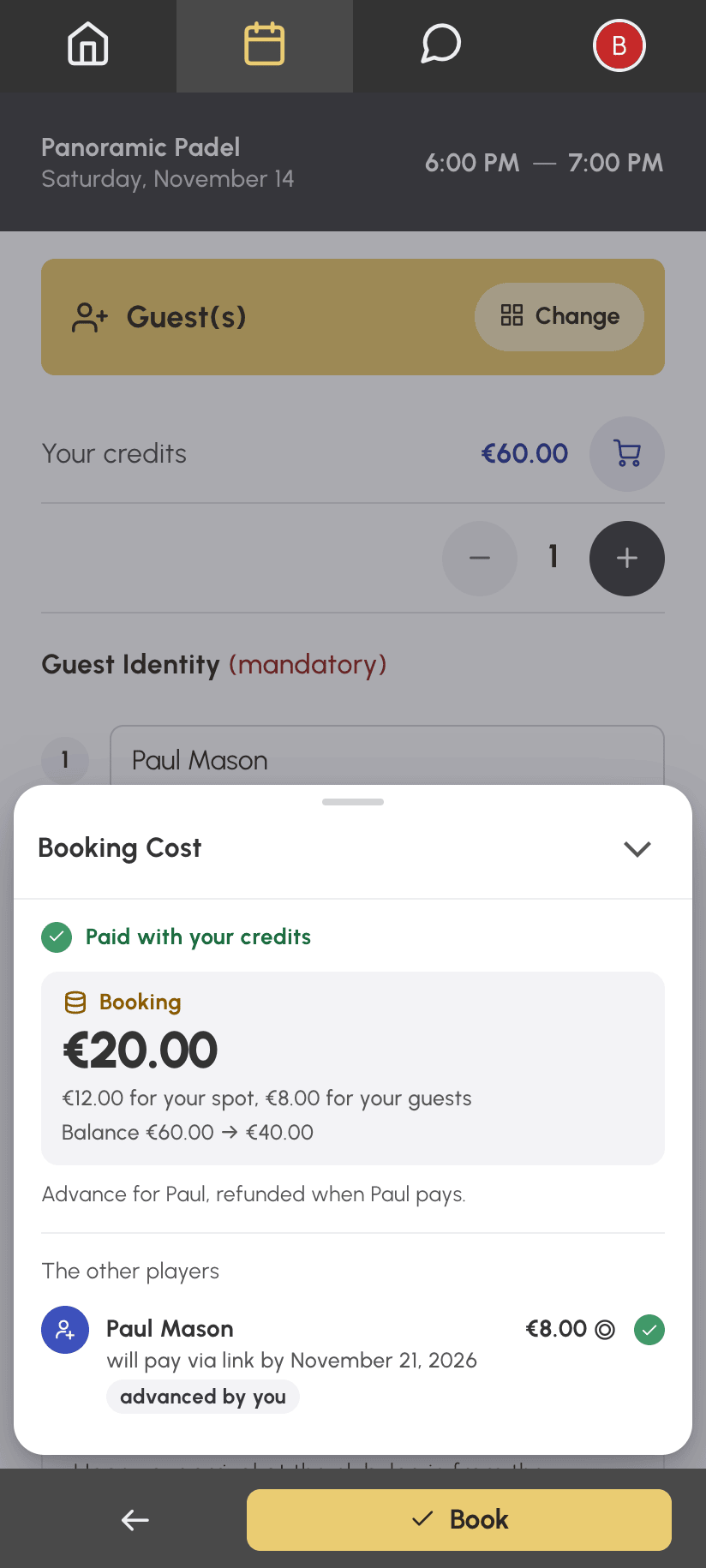
No viesa pieprasītā summa tiek noteikta rezervācijas brīdī: tā nemainās, ja rezervācija vēlāk tiek pārvietota vai mainās tās ilgums. Savukārt termiņš mainās līdz ar rezervāciju. Pēc termiņa beigām saite vairs nav derīga, un avansā segtā daļa paliek jūsu ziņā.
Ja jūsu kredītu nepietiek un jūsu organizācija piedāvā maksājumu rezervēšanas brīdī, jūs rezervējot samaksājat trūkstošo summu, ieskaitot viesa daļu. Kad viesis samaksā, šī daļa jums tiek atgriezta kredītos, pat ja par to maksājāt ar karti.
Gaidīt viesa maksājumu: „tagad”
Izvēloties „tagad”, rezervācija tiek apstiprināta tikai pēc tam, kad viesa daļa ir samaksāta, un šī daļa nepaliek jūsu ziņā. Rezervācija gaida maksājumu jūsu organizācijas noteiktajā termiņā maksājumam rezervēšanas brīdī — parasti dažas minūtes. Gaidīšanas laikā viesa daļa tiek norakstīta no jūsu kredītiem, pat ja jūsu atlikums nav pietiekams, un tiklīdz rezervācija ir apstiprināta, tā jums tiek atgriezta. Šī izvēle pastāv tikai tad, ja jūsu organizācija piedāvā maksājumu rezervēšanas brīdī.
Pēc Rezervēt atveras rezervācijas informācija ar atlikušo laiku, un tā automātiski atjauninās, kamēr ir atvērta. Gaidīšanas laikā rezervāciju nevar mainīt. Atkarībā no jūsu paziņojumu iestatījumiem par katru viesa maksājumu jūs saņemat e-pasta paziņojumu; tiklīdz visi ir samaksājuši, rezervācija tiek apstiprināta un jūs saņemat parasto apstiprinājuma e-pastu.
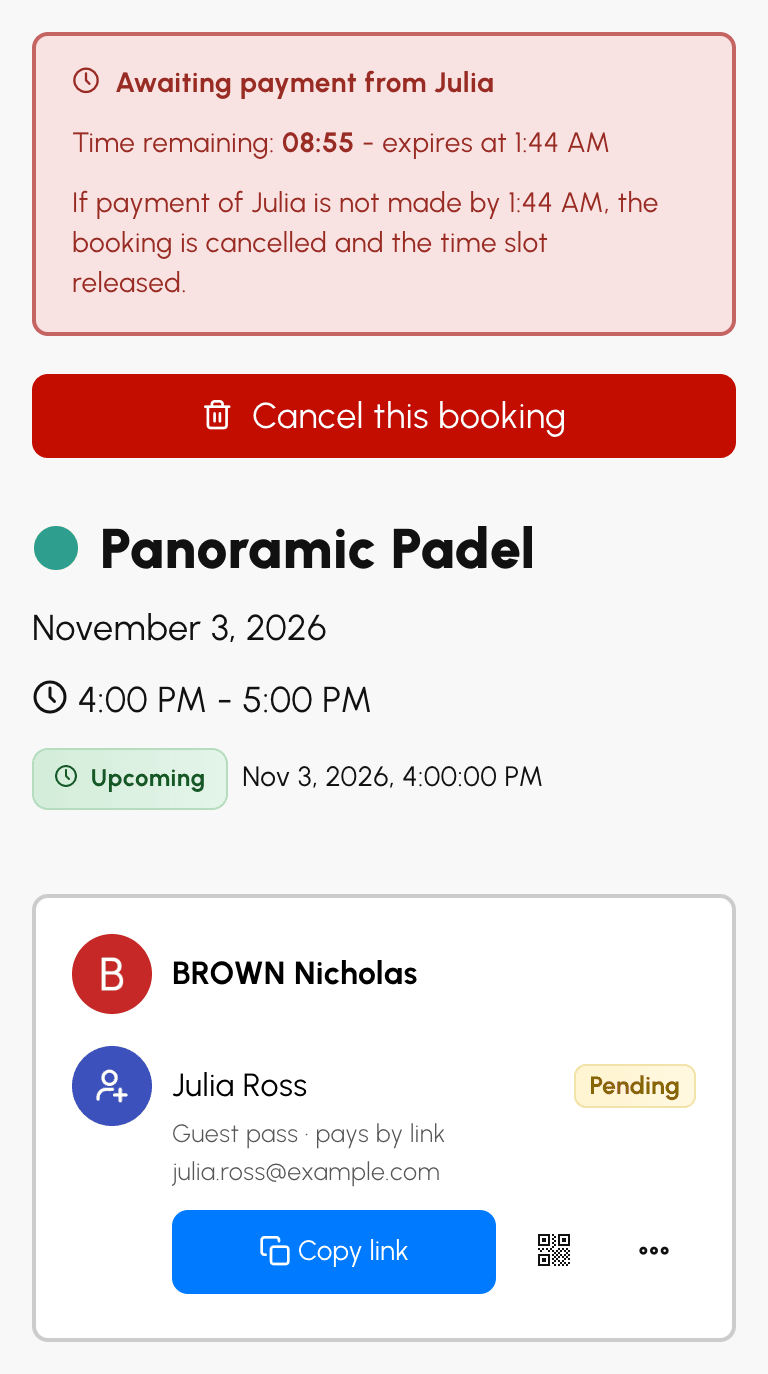
Ja maksājums netiek veikts laikā, rezervācija tiek atcelta un laika posms atbrīvots, jūsu kredīti jums tiek atgriezti, un e-pastā tiek norādīts, kuru maksājumu trūka. Viesim, kurš jau bija samaksājis, viņa daļa tiek atmaksāta vai, atkarībā no viņa maksājuma veida, atgriezta jums kredītos.
Ja jūsu pašu kredītu nepietiek, vispirms samaksājiet trūkstošo summu, tāpat kā jebkuram maksājumam rezervēšanas brīdī. Pēc tam rezervācija gaida jūsu viesu maksājumu; lapā, kas apstiprina jūsu maksājumu, Skatīt rezervāciju atver rezervācijas informāciju.
Nodot maksājuma saiti
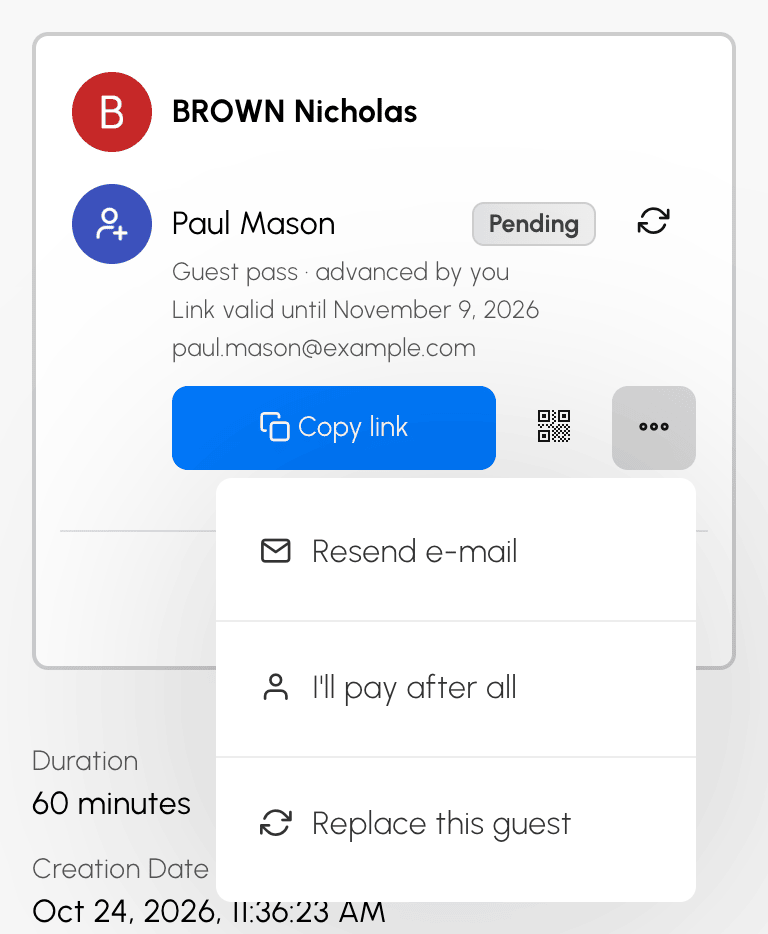
Ja ievadījāt viesa e-pasta adresi, saite viņam tiek nosūtīta automātiski jūsu valodā. Pretējā gadījumā nododiet to viesim rezervācijas informācijā, zem viesa rindas:
- Kopēt saiti nokopē saiti, ko varat ielīmēt ziņojumā;
- parāda QR kodu, ko viesis noskenē ar savu tālruni — ērti, ja viņš ir blakus;
- izvēlnē Nosūtīt pa e-pastu pieprasa viesa adresi un nosūta viņam saiti.
Kad adrese ir zināma, izvēlnes ieraksts kļūst par Nosūtīt e-pastu atkārtoti ar jau aizpildītu adresi: izlabojiet to, ja tā bija nepareiza, un saite uzreiz tiek nosūtīta uz jauno adresi. Uz vienu un to pašu adresi starp diviem sūtījumiem pagaidiet 2 minūtes. Sūtījumu skaits vienai saitei ir ierobežots.
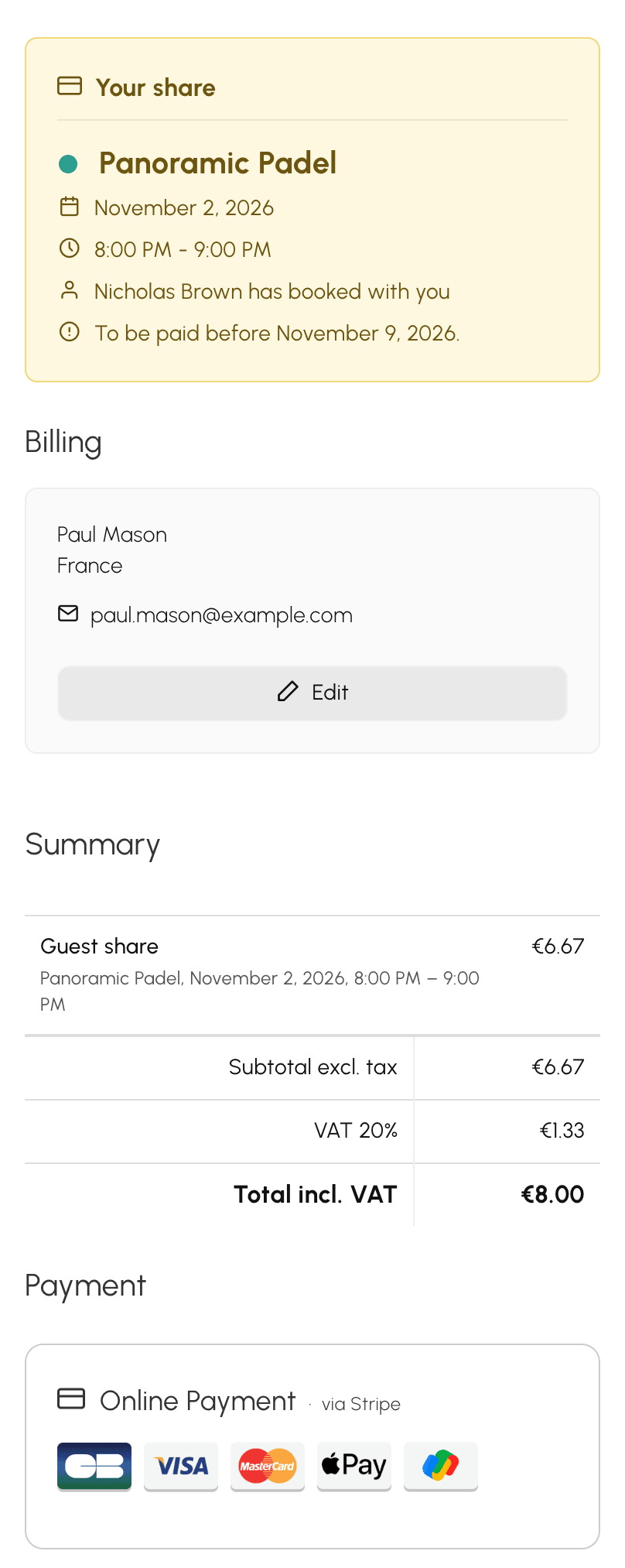
Saite atver maksājuma lapu jūsu organizācijas krāsās ar jūsu vārdu, laika posmu, viesa daļu un termiņu. Viesis maksā tiešsaistē. Izvēles „vēlāk” gadījumā jūsu organizācija var arī ļaut viesim samaksāt uz vietas, ar čeku vai pārskaitījumu: tad viesa daļa ir samaksāta, kad jūsu organizācija ir saņēmusi maksājumu.
Ja neievadījāt viesa e-pasta adresi, tā viesim tiek pieprasīta pirms maksāšanas, lai nosūtītu viņam rēķinu. Pēc tam tā parādās rezervācijas informācijā.
Saiti, QR kodu un jūsu viesu izvēlni redzat tikai jūs. Pārējie rezervācijas dalībnieki redz tikai to, vai viesis ir samaksājis.
Mainīt viesus, kuri maksā ar saiti
Rezervācijas informācijā joprojām iespējamas vairākas izmaiņas:
- jūs tomēr vēlaties segt vietu viesim ar izvēli „vēlāk”, kurš vēl nav samaksājis: viņa izvēlnē izvēlieties Tomēr samaksāšu. Viesa saite vairs nav derīga, viņa daļa paliek jūsu ziņā, un viņam par to netiek paziņots;
- viesis atsakās: Aizstāt šo viesi viņa izvēlnē pievieno citu personu viņa vietā, un jūs vēlreiz izvēlaties, kurš maksā: jūs vai jaunais viesis ar izvēli „vēlāk”. Viesu skaits un rezervācijas izmaksas nemainās, un vecā saite vairs nav derīga. Viesi, kurš jau ir samaksājis vai paziņojis par maksājumu uz vietas, ar čeku vai pārskaitījumu, nevar aizstāt atsevišķi: šādā gadījumā aizstājiet visus viesus;
- jūs vēlaties nomainīt visus viesus: pirmās viesu rindas ikona aizstāj tos visus. Pirms saglabāšanas ziņojums atgādina, kuras saites tiks atceltas un ka viesiem, kuri jau bija samaksājuši, tiks veikta atmaksa;
- jums pievienojas vēl viens viesis: Pievienot dalībnieku, pēc tam rinda Viesis(i). Ja pievienojat tikai viesus, bez partnera, katrs var maksāt „vēlāk”; „tagad” pēc rezervācijas veikšanas nekad netiek piedāvāts.
Kamēr kādam viesim ir aktīva maksājuma saite vai viesis ir samaksājis ar saiti, jūs nevarat pamest rezervāciju, kas turpinās ar citiem dalībniekiem, un arī jūs tajā nevar aizstāt: vispirms noņemiet viesus vai atceliet rezervāciju.
Atcelt rezervāciju, par kuru viesis ir samaksājis
Ja atceļat laikā, viesim, kurš jau ir samaksājis, viņa daļa tiek atmaksāta, izmantojot viņa maksājuma veidu, ja tas ir iespējams; pretējā gadījumā tā jums tiek atgriezta kredītos. Abos gadījumos to norāda atcelšanas apstiprinājuma ziņojums, un atcelšanas e-pasts to apstiprina. Ja atcelšana ir pārāk vēla, lai jums atgrieztu ielūgumus, jūsu organizācija patur arī viesa daļu.
Viesis, kurš vēl nav samaksājis, to vairs nevar izdarīt: viņa saite vairs nav derīga.
Uzzināt jūsu organizācijas noteiktos ierobežojumus
Jūsu organizācija var:
- ierobežot viesu skaitu vienā rezervācijā;
- ierobežot ielūgumu skaitu noteiktā laika periodā;
- aizliegt ielūgumus noteiktos kalendāros, noteiktās dienās vai noteiktos laika intervālos: tādā gadījumā veidlapā to norāda ziņojums;
- atļaut atcelt rezervāciju ar viesiem tikai noteiktos gadījumos.
