



Rezervācijas atcelšana vai mainīšana
Kalendāros varat atcelt, pārvietot vai mainīt rezervācijas ilgumu, kā arī mainīt tās dalībniekus. To var darīt jūsu organizācijas noteiktajos termiņos un saskaņā ar tās noteikumiem.
Atcelšana kalendāros
- Atveriet kalendāru un noklikšķiniet uz savas rezervācijas. Varat arī atvērt izvēlni Manas rezervācijas un atrast savu rezervāciju vēsturē.
- Noklikšķiniet uz atcelšanas pogas.
- Apstipriniet ar Jā, turpināt! vai atsakieties ar Atcelt.
Jūs saņemsiet paziņojumu. Jūsu partneri to saņems atbilstoši saviem iestatījumiem.
Dalībnieku mainīšana
- Noklikšķiniet uz savas rezervācijas kalendārā vai izvēlnē Manas rezervācijas, lai skatītu tās informāciju.
- Atkarībā no jūsu organizācijas noteikumiem varat pievienot dalībnieku ar pogu Pievienot dalībnieku. Varat arī veikt aizstāšanu, noklikšķinot uz ikonas .
- Ja vēlamās izmaiņas nav iespējamas, atceliet rezervāciju un rezervējiet no jauna atļautajos termiņos.
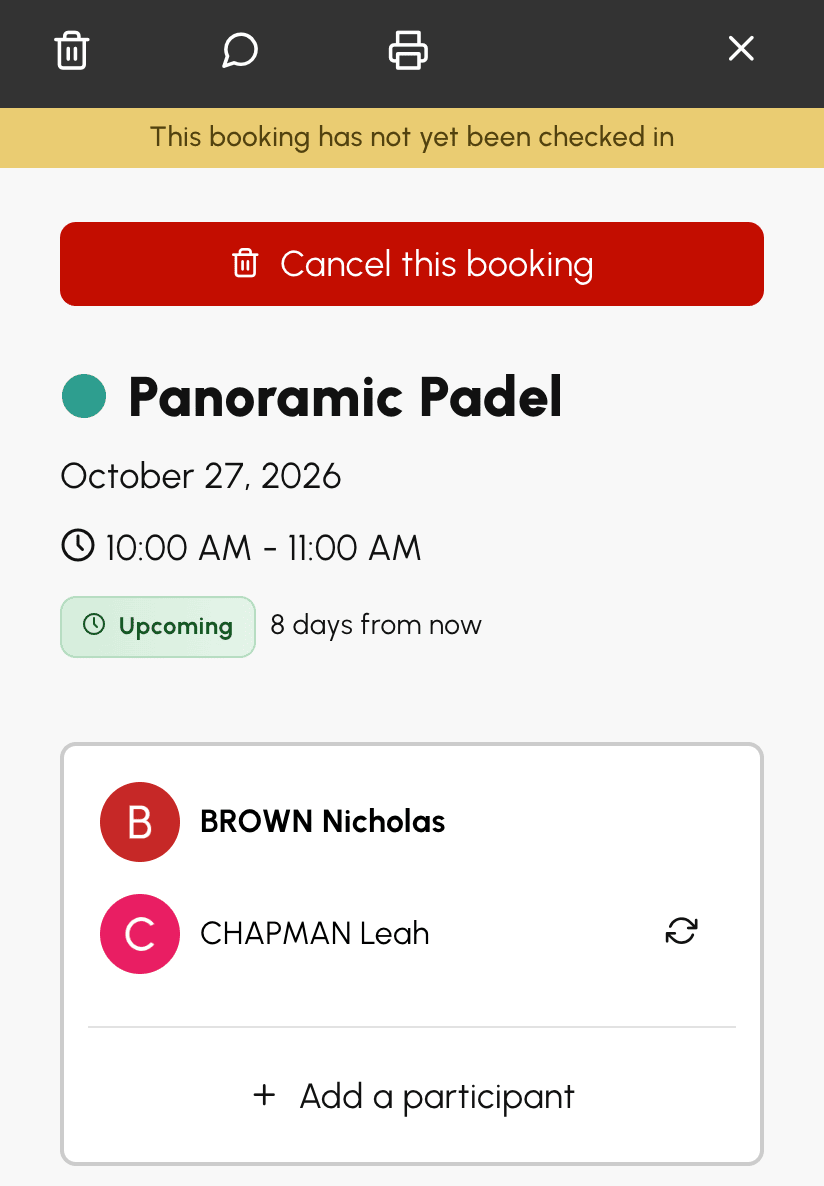
Draugs var piekrist pēdējā brīdī aizstāt partneri, kurš atsakās. Šādā gadījumā varat uzdāvināt draugam viņa vietu ar slēdzi Es maksāju, ja jūsu abonements ļauj maksāt par partneriem. Pirms saglabāšanas logā redzams, kādi kredīti tiks norakstīti vai atgriezti un kam.
Rezervācijas pārvietošana
Ja jūsu organizācija to atļauj, varat pārvietot rezervāciju uz citu laiku, citu laukumu vai citu dienu, velkot to kalendāros. Rezervācija nav jāatceļ un jārezervē no jauna.
- Satveriet rezervāciju kalendārā. Turiet uz tās nospiestu peles pogu vai tālrunī vai planšetdatorā pieskarieties tai un turiet pussekundi.
- Velciet to. Priekšskatījums seko rādītājam un parāda jauno laiku.
- Atlaidiet vēlamajā vietā.
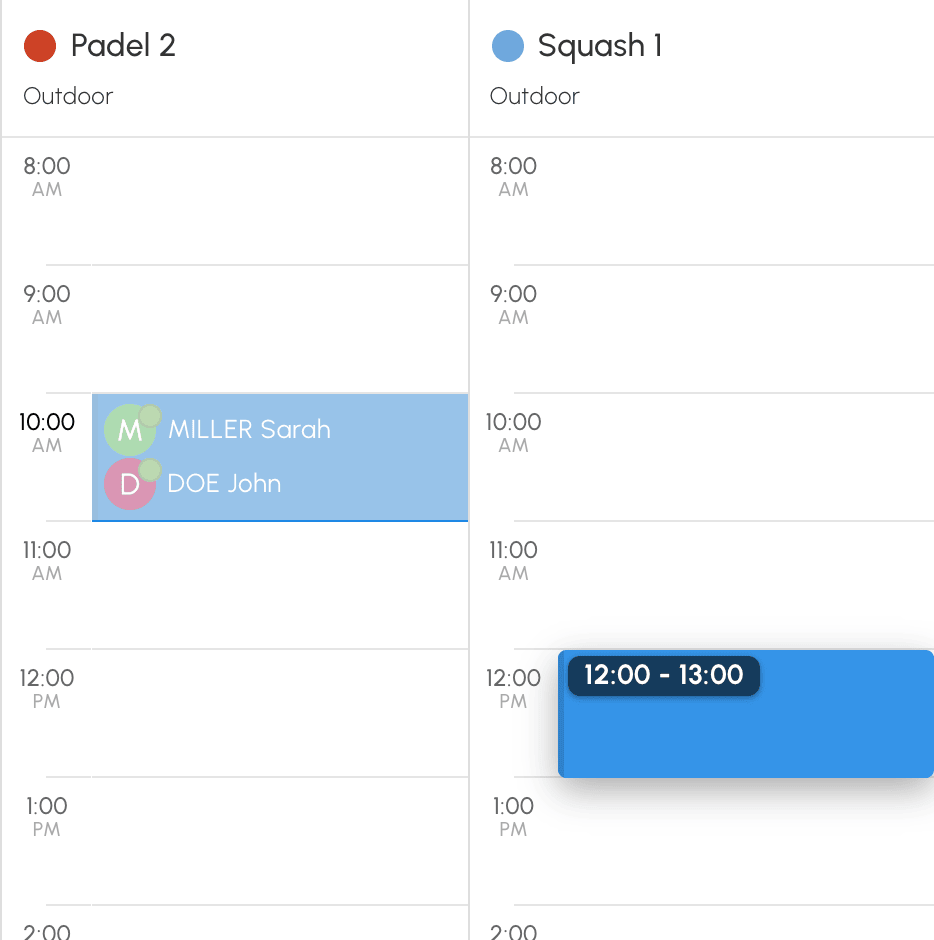
Klikšķis vai īss pieskāriens vienmēr atver rezervācijas informāciju. Skārienekrānā pārvietošanu uzsāk pussekundi ilgs pieskāriens. Ja pirksts sāk slīdēt uzreiz, kalendāri vienkārši ritinās.
Ja priekšskatījums kļūst sarkans, šī vieta nav atļauta. Atlaidiet rezervāciju: logā būs norādīts iemesls, un rezervācija paliks savā vietā.
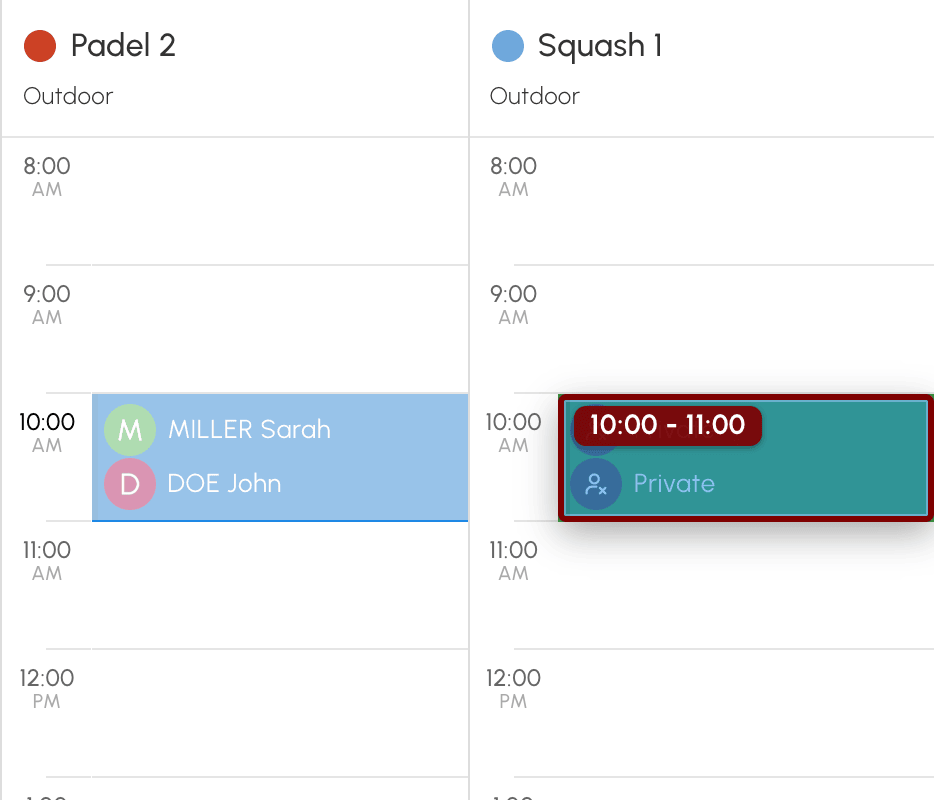
Pārvietošana notiek saskaņā ar jūsu abonementa noteikumiem:
- varat pārvietot tikai savas rezervācijas un vienmēr tikai uz brīvu laika posmu;
- rezervāciju var pārvietot, kamēr to vēl var atcelt;
- rezervāciju ar vairākiem spēlētājiem, kurā katrs spēlētājs atceļ savu vietu, var pārvietot tikai rezervācijas īpašnieks;
- sākuma laiki ir tie, ko piedāvā rezervācijas veidlapa, un atvērtie datumi, kvotas un kredīti tiek piemēroti tāpat kā jaunai rezervācijai.
Ja jaunais laika posms maksā vairāk kredītu, starpība tiek norakstīta. Ja tas maksā mazāk, starpība jums tiek atgriezta, nepārsniedzot jūsu samaksāto summu. Par vietu, ko apmaksājis cits spēlētājs, starpību maksā vai atgūst šis spēlētājs. Ja mainās diena, laiks vai laukums, jūs un jūsu partneri saņemat e-pastu atbilstoši paziņojumu iestatījumiem. Ja jūsu organizācija izmanto piekļuves kodus, jaunā laika posma kodi tiek parādīti pēc pārvietošanas, tāpat kā pēc rezervēšanas.
Rezervācijas ilguma maiņa
Ja jūsu abonements ļauj izvēlēties rezervāciju ilgumu, varat to mainīt arī kalendāros.
- Parādiet rezervācijas rokturus. Novietojiet virs tās peles rādītāju vai skārienekrānā pieskarieties tai uz pussekundi un paceliet pirkstu, to nekustinot.
- Satveriet augšējo rokturi, lai mainītu sākuma laiku, vai apakšējo, lai mainītu beigu laiku. Ar pirkstu rokturi var satvert uzreiz: atkārtots ilgs pieskāriens nav vajadzīgs.
- Velciet un pēc tam atlaidiet.
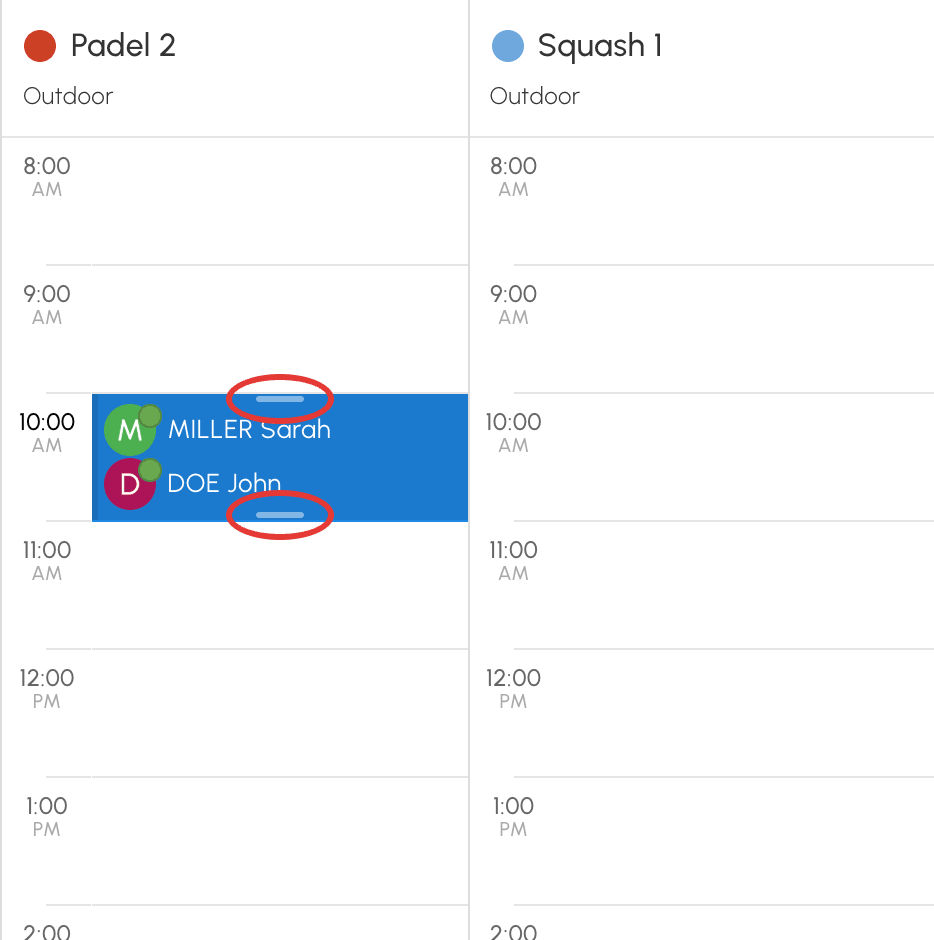
Skārienekrānā rezervācija paliek atlasīta un izcelta ar ēnu, līdz pieskaraties ekrānam ārpus tās. Tās rokturi ir divi apaļi punkti augšējā labajā un apakšējā kreisajā stūrī. Īss pieskāriens kādam no tiem neko nedara. Lai pārvietotu atlasīto rezervāciju, velciet to bez atkārtota ilga pieskāriena. Īss pieskāriens rezervācijai atver tās informāciju.
Priekšskatījums apstājas pie jūsu abonementa atļautā minimālā un maksimālā ilguma. Ja rezervācijai nav rokturu, tās ilgumu nevar mainīt. Šādā gadījumā pārvietojiet to vai atceliet un rezervējiet no jauna.
Jūsu organizācijas atcelšanas noteikumi
Katra organizācija nosaka savus noteikumus, tāpēc jūsu abonements var:
- aizliegt jebkādu atcelšanu;
- ierobežot atcelšanu laikā, piemēram, līdz noteiktam brīdim pirms laika posma sākuma;
- ierobežot atcelšanu skaitu noteiktā periodā;
- aizliegt atcelt rezervācijas ar viesiem;
- rezervācijā ar vairākiem spēlētājiem ļaut katram spēlētājam izņemt tikai savu vārdu: tad pilnībā atcelt laika posmu var tikai rezervācijas īpašnieks.
Ja jūsu vietu apmaksā cits spēlētājs, jūs nevarat izstāties tikai no daļas rezervācijas, piemēram, no otrās stundas rezervācijā no 18:00 līdz 20:00. Jūsu izstāšanās attiecas uz visu rezervācijas ilgumu, un rezervācija turpinās citiem spēlētājiem. Pirms apstiprināšanas par to tiek parādīts brīdinājums.
Kredītu atgūšana pēc atcelšanas
Ja tika norakstīti rezervācijas kredīti vai ielūgumu kredīti, tie tiek automātiski atgriezti atcelšanas brīdī saskaņā ar jūsu organizācijas noteikumiem. Katra summa tiek atgriezta spēlētājam, kurš to samaksāja. Ja jūs apmaksājāt partnera vietu, to atgūstat jūs saskaņā ar šī partnera abonementa atcelšanas nosacījumiem. Atgrieztā summa ir tā, kas tika samaksāta, pat ja tarifs vai jūsu abonements kopš tā laika ir mainījies.
Ja viesis jau bija samaksājis savu daļu, izmantojot saiti, tās liktenis ir tāds pats kā jūsu ielūgumiem. Ja ielūgumi jums tiek atgriezti, viesim tiek veikta atmaksa uz viņa maksājuma veidu. Ja šis maksājuma veids neļauj veikt atmaksu, viesa daļa jums tiek atgriezta kredītos. To norāda atcelšanas apstiprinājuma ziņojums, un atcelšanas e-pasts to apstiprina. Ja jūsu ielūgumi jums netiek atgriezti, jūsu organizācija patur arī viesa daļu.
Kredīti netiek atgriezti, ja tie netika norakstīti, piemēram, ja organizācija tās pašas dienas rezervācijas nodrošina bez maksas.
Maksājumu kopsavilkums rezervācijas informācijas apakšā norāda, ko katrs spēlētājs samaksāja un kas viņam tika atgriezts. To joprojām var apskatīt pēc atcelšanas, izmantojot Mans konts›Manas rezervācijas.
Rezervāciju un atcelšanu atrašana
Pilna vēsture ir pieejama sadaļā Mans konts›Manas rezervācijas: gaidāmie laika posmi, pagātnes rezervācijas un atcelšanas ar to statusu. Opcija Paslēpt atcelšanas ļauj saīsināt sarakstu.
