



Produkti & pakalpojumi
Katalogā ir apkopots viss, ko jūsu organizācija pārdod: rezervācijas kredīti, abonementi, inventārs, ēdiens un dzērieni, turnīri, nodarbības, treniņnometnes… No tā tiek ņemts saturs lietotāju grozam, kases aparātam un manuālajiem pasūtījumiem.
Produktu veidi
Katrs produkts pieder kādai kategorijai: abonements, rezervācijas kredīts, viesu kredīts, inventārs, ēdiens un dzērieni, turnīrs, nodarbība, treniņnometne vai pielāgots produkts. Ar cilnēm virs saraksta katalogu var filtrēt pēc kategorijas.
Produkta izveide
- Atveriet sadaļu Administrācija›Iestatījumi›Norēķini›Produkti un pakalpojumi.
- Noklikšķiniet uz Jauns.
- Izvēlieties produkta veidu, pēc tam ievadiet nosaukumu, neobligātu aprakstu un krāsu.
- Noklikšķiniet uz Saglabāt.

Pēc tam produktu var publicēt jūsu sākumlapas tiešsaistes veikalā.
Cenas un nodokļu noteikšana
- Norādiet vienības cenu ar PVN: summa bez nodokļiem tiek parādīta automātiski.
- Pārbaudiet nodokļu likmes: tās ir iepriekš aizpildītas ar organizācijas noklusējuma likmēm, kuras var iestatīt sadaļā Administrācija›Iestatījumi›Konta iestatījumi.
- Lai iestatītu apjoma atlaidi, noklikšķiniet uz Pievienot kvantitatīvo cenu un nosakiet cenu katram daudzuma līmenim (piemēram, 10 vienības par samazinātu cenu).
- Ieslēdziet opciju Brīva daudzuma izvēle, ja lietotājs pasūtījuma laikā var pats izvēlēties daudzumu pieejamā krājuma robežās (ja attiecināms).
Krājuma uzskaite
Atkarībā no produkta veida (ēdiens un dzērieni, inventārs, ...) varat pārvaldīt produkta pieejamo krājumu.
- Ievadiet krājumā esošo daudzumu vai atzīmējiet Neierobežots krājums.
- Krājums tiek automātiski atjaunināts, notiekot pārdošanai. To varat koriģēt jebkurā brīdī.
- Iestatiet zema krājuma slieksni, lai saņemtu brīdinājumu, kad krājums nokrītas zem tā: vērtība 0 brīdinājumu izslēdz.
- Brīdinājums tiek nosūtīts uz kluba e-pasta adresi. Lai to nosūtītu citai personai, piemēram, bufetes vadītājam, aizpildiet lauku Brīdinājuma e-pasta adrese.
Abonementa pārdošana tiešsaistē
Abonementa pārdošana netiek konfigurēta katalogā, bet gan paša abonementa ierakstā: sadaļā Administrācija›Lietotāji›Piekļuves tiesības›Abonementi, cilnē Vispārīgi, apakšsadaļā Maksājumi un rēķini. Ieslēdzot šo apakšsadaļu, atbilstošais produkts tiek izveidots automātiski.
Pēc tam produktu var rediģēt abās vietās: gan sadaļā Administrācija›Iestatījumi›Norēķini›Produkti un pakalpojumi, gan abonementa ierakstā. Abas veidlapas rediģē vienu un to pašu ierakstu.
Slīdošajam termiņam vai fiksētiem cikliem, proporcionālajam aprēķinam, atjaunošanai un priekšpārdošanai ir veltīta atsevišķa lapa.
Maksājuma pa daļām piedāvāšana
- Produkta ierakstā iestatiet opciju Maksājums vairākās daļās, izvēloties maksimālo iemaksu skaitu.
- Kopsumma tiek sadalīta vienādās daļās. Pirmā iemaksa tiek samaksāta nekavējoties, un pakalpojumi tiek nodrošināti jau pēc šī pirmā maksājuma.
Paziņojums pa e-pastu par katru pārdošanu
Automātiski informējiet attiecīgās personas, tiklīdz tiek pārdots konkrēts produkts: bufetes vadītāju par dzērienu, treneri par treniņnometni vai piegādātāju, kurš sagatavo inventāra pasūtījumu.
- Atveriet produktu sadaļā Administrācija›Iestatījumi›Norēķini›Produkti un pakalpojumi.
- Ieraksta apakšā ieslēdziet opciju Paziņojumi pa e-pastu.
- Laukā Saņēmēju adreses (viena rindā, maksimums 4) ievadiet līdz 4 adresēm, katru savā rindā.
- Noklikšķiniet uz Saglabāt.
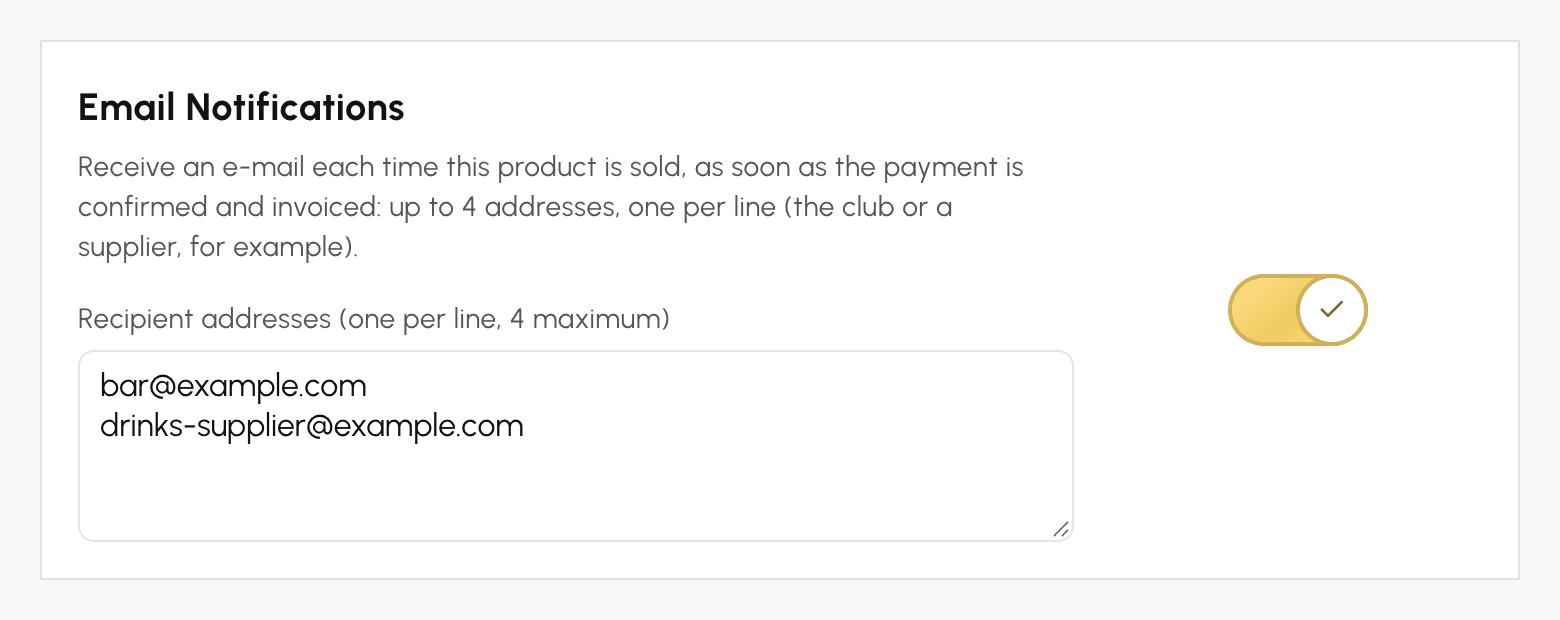
E-pasts tiek nosūtīts tikai vienu reizi par katru pasūtījumu, tiklīdz maksājums ir apstiprināts un rēķins izrakstīts: tiešsaistes maksājums, pārdošana kasē vai administratora reģistrēts maksājums. Maksājuma pa daļām gadījumā tas tiek nosūtīts pēc pirmās iemaksas.
Tajā ir norādīts produkts, daudzums, rindas summa ar PVN (pirms iespējamās atlaides visam pasūtījumam), rēķina numurs un maksājuma datums, kā arī pircēja vārds, e-pasts un tālrunis. Tajā nav pielikuma, saites uz jūsu administrēšanas vidi, ne arī citu pasūtījuma produktu. Ja pasūtījumā ir vairāki uzraudzīti produkti, katrs no tiem nosūta savu e-pastu saviem adresātiem.
Lai pārtrauktu šos e-pastus, izslēdziet opciju Paziņojumi pa e-pastu un saglabājiet: adreses tiks dzēstas. Par pārdošanu, kas apmaksāta ar maksājumu vārteju testa režīmā, e-pasts netiek nosūtīts.
Lai saņemtu e-pastu par katru maksājumu neatkarīgi no pārdotā produkta, labāk izmantojiet norēķinu konta paziņojumus.
Produktu redzamības pārvaldība
- Iegādāties var tikai aktīvus produktus: izslēdziet opciju Aktīvs produkts, lai īslaicīgi izņemtu produktu no pārdošanas, to nedzēšot.
- Poga Arhivēt paneļa augšdaļā neatgriezeniski izņem produktu no kataloga. Tā pārdošanas vēsture tiek saglabāta.
- Izslēgtie produkti un produkti, kas izveidoti uzreiz no manuāla pasūtījuma, pēc noklusējuma sarakstā ir paslēpti: parādiet tos, izmantojot Iekļaut deaktivētos produktus un Iekļaut vienreizējos produktus saraksta iestatījumu izvēlnē .
