



Pronalaženje partnera za igru
Pronađite igrače svog nivoa: pridružite se WhatsApp grupama organizacije, objavite oglas, pogledajte imenik, otvorite svoje rezervacije drugim korisnicima ili se priključite njihovim.
Otvaranje rezervacije drugim igračima
Prilikom rezervisanja, opcija Pretraga partnera otvara vaš termin drugim korisnicima: oni mogu odmah da se priključe, do dozvoljenog broja učesnika.
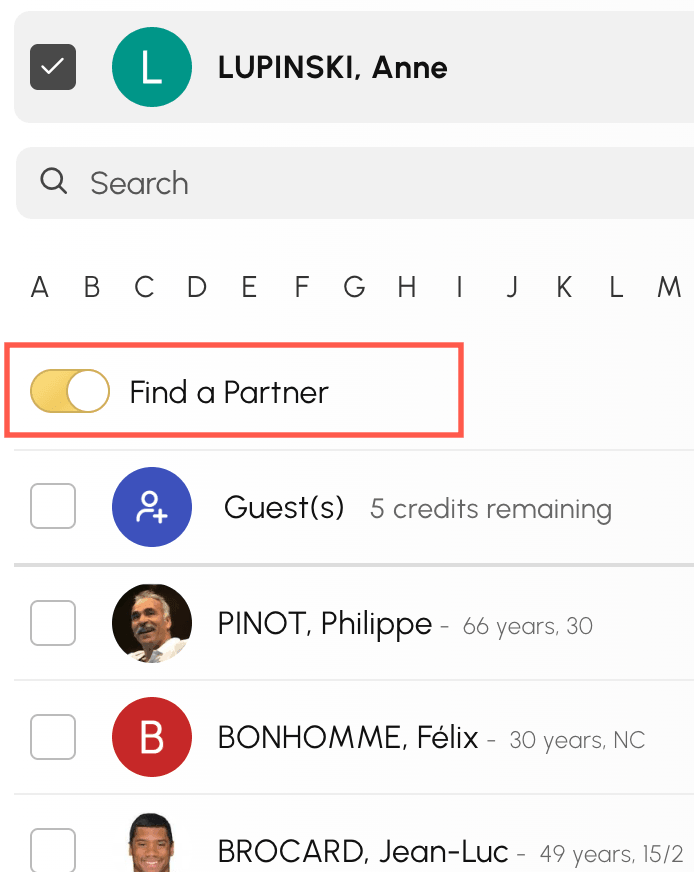
Priključivanje otvorenoj rezervaciji
Ako je vaša organizacija aktivirala prikaz Dostupnosti, njegova kartica Pretraga partnera okuplja rezervacije koje su drugi igrači otvorili i u kojima još ima mesta. Više ne morate da ih tražite jednu po jednu po kalendarima.
- Otvorite Dostupnosti iz menija za rezervaciju
- Izaberite dan u gornjoj traci, a zatim kliknite na karticu Pretraga partnera. Broj prikazan na kartici označava koliko rezervacija možete da se priključite tog dana.
- Pregledajte kartice: svaka prikazuje vreme, teren, trajanje, već prijavljene igrače i preostala slobodna mesta.
- Kliknite na Dodaj moje ime: otvara se obrazac za rezervaciju, a vi ga potvrđujete da biste se priključili ostalim igračima.
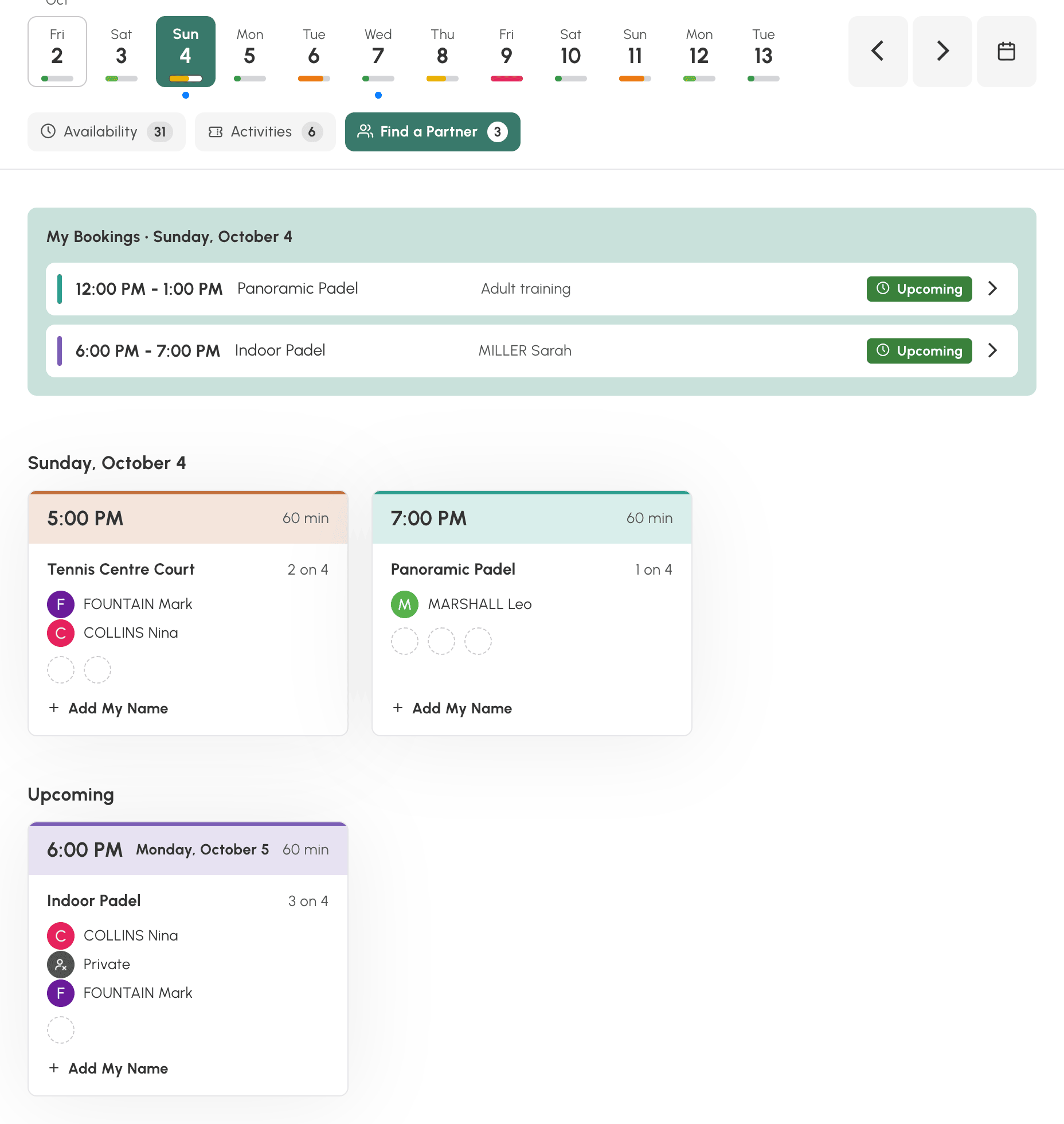
Ispod rezervacija za izabrani dan, odeljak Uskoro prikazuje one iz narednih dana. Ako izabrani dan nema nijednu, taj odeljak se prikazuje odmah.
Vaše sopstvene rezervacije se tu ne prikazuju, a kartica se pojavljuje samo ako postoji bar jedna rezervacija kojoj možete da se priključite. Imena i fotografije zavise od podešavanja organizacije i od izbora privatnosti svakog korisnika: igrač se može prikazati kao Privatno.
Otvorenoj rezervaciji možete da se priključite i iz prikaza Kalendari po danu i Kalendari po nedelji: u tom slučaju se na terminu pojavljuje oznaka Dodaj moje ime. Ipak, tada morate da pregledate kalendare da biste pronašli te termine, dok ih prikaz Dostupnosti okuplja sve na jednom mestu.
Pridruživanje WhatsApp grupi
Vaša organizacija može da vodi WhatsApp grupe, na primer po nivou ili po disciplini. One koje se odnose na vas prikazuju se na vrhu stranice Pronađi partnera, a ponekad i na početnoj stranici organizacije.
- Otvorite Pronađi partnera iz menija za rezervaciju
- Pregledajte ponuđene grupe, a zatim kliknite na Pridruži se na WhatsApp-u.
- WhatsApp se otvara na pozivnici grupe: potvrdite da biste joj se pridružili.

Svojim članstvom zatim upravljate u aplikaciji WhatsApp: tamo napuštate grupu.
Objavljivanje oglasa
- Otvorite Pronađi partnera iz menija za rezervaciju
- Kliknite na Dodaj oglas.
- Unesite traženi nivo, svoje dane i vremenske želje, i predstavite se u nekoliko reči.
- Izaberite kako želite da vas kontaktiraju: preko interne poruke, a ako želite i telefonom.
- Potvrdite pomoću Sačuvaj.

Vaš oglas vide ostali korisnici organizacije. Možete ga izmeniti u svakom trenutku pomoću Izmeni moj oglas: obrazac nudi i Ukloni moj oglas za njegovo uklanjanje.

Pregled imenika organizacije
Ako ga je vaša organizacija aktivirala, Imenik članova kluba prikazuje korisnike koji su pristali da se u njemu nalaze. Potražite igrača po prezimenu, imenu, rangiranju ili godini rođenja, a zatim ga kontaktirajte preko interne poruke.

Upravljanje svojom vidljivošću
Svako bira šta deli. U delu Moj nalog›Privatnost možete naročito:
- izabrati između Prikazuj se u imeniku i Ne prikazuj se u imeniku;
- odrediti ko može da rezerviše sa vama (svi korisnici, dozvoljena lista, blokirana lista ili niko);
- odrediti ko može da vam pošalje poruku;
- sakriti svoj identitet ili svoju fotografiju u kalendarima.
Dugme Postavke privatnosti u imeniku vodi direktno do ovih podešavanja.
