



Kasa
Prodajte na pultu bez kreiranja porudžbine: sastavite korpu svog kupca pomoću dodirnih pločica, a zatim naplatite njegovo plaćanje. Idite u meni Administracija›Kontrolna tabla›Fakturisanje›Kasa.
Kada koristiti kasu
Kasa nije namenjena samo trenutnim plaćanjima: ona je jednostavno drugi način da kreirate prodaju, neposredniji od formulara porudžbine. Korpu sastavljate u nekoliko dodira, a status koji dodelite plaćanju određuje šta će biti sa prodajom.
- Plaćanje Potvrđeno: prodaja se plaća odmah i postaje faktura. To je slučaj na pultu — tubus loptica, piće, paket kredita.
- Plaćanje Na čekanju: za sada se ništa ne naplaćuje, prodaja ostaje na čekanju plaćanja. Upravo ste izdali narudžbenicu, koju će kupac platiti kasnije uplatom ili prilikom sledeće posete.
Mnogim upravnicima je kasa intuitivnija od menija prodaje za kreiranje porudžbine, čak i bez naplate: proizvodi su pred očima, u vidu pločica, umesto u formularu.
Tako treba gledati na ova dva ekrana: kasa je brza i pokriva ono najvažnije, praćenje prodaje nudi sva podešavanja. Ništa vas ne sprečava da počnete jednim, a završite drugim.
Sastavljanje korpe
Katalog se prikazuje u vidu pločica. Svaki klik dodaje artikal u Korpa, a drugi povećava količinu.

Nekoliko kartica pomaže da brzo pronađete artikal: Svi, Omiljeno, Popularni — najprodavaniji — i Razno, uz kategorije vašeg kataloga. Polje Pretraži ostaje najbrže čim se katalog proširi.
Pločice prikazuju Zaliha ako proizvod ima praćenje zaliha, kao i oznaku Prekid kada je rasprodat.
Prodaja onoga što nije u katalogu
Dugme Prilagođeno kreira stavku u hodu: Etiketa, Ukupan iznos sa PDV-om i stopa PDV. Ako se artikal redovno ponavlja, bolje ga jednom za svagda kreirajte u katalogu: prečica Upravljaj proizvodima vodi direktno tamo, a dobićete i praćenje prodaje po proizvodu.
Povezivanje prodaje sa osobom
Podrazumevano se prodaja evidentira na Povremeni posetilac. To je pravi izbor za posetioca koji kupuje piće.

Povežite je sa korisnikom čim priroda kupovine to zahteva, a to je neophodno u dva slučaja:
- prodaja kredita, koja mora da pripiše kredite određenom nalogu da bi bila upotrebljiva;
- pretplata, koja ima smisla samo ako je vezana za osobu — dugme Izaberite plan tada bira željeni plan.
Dugme Odvojiti vraća na kupca u prolazu ako ste izabrali pogrešnu osobu.
Unos podataka kupca u prolazu
U trenutku naplate možete uneti identitet i adresu kupca bez otvaranja naloga: prezime, ime, adresu, kao i blok Adresa kompanije sa Poslovno ime, Identifikacioni broj organizacije i PDV brojem za prodaju preduzeću.
Ovi podaci se trajno beleže uz prodaju. Služe za izdavanje fakture na ime i omogućavaju da se prodaja kasnije pronađe: pretraga u praćenju porudžbina pretražuje upravo ta polja, bez kojih bi sve prodaje na pultu izgledale isto.
Primena popusta
Dve mogućnosti, direktno u korpi:
- Promo kod, koji primenjuje već definisanu komercijalnu akciju;
- Ručno odobrenje popusta, u Procenat ili u Iznos, koji se određuje od slučaja do slučaja.
Ukupan iznos odmah uzima popust u obzir, ali obratite pažnju na napomenu „procenjeni popust, ponovo potvrđen pri naplati“: kod kojem je istekao rok ili kojem je dostignuta granica upotrebe biće odbačen u trenutku potvrde, a stvarni iznos će vam biti prikazan pre nego što potvrdite.

Naplata plaćanja
- Kliknite na Naplati: korpa se zaključava i otvara se prozor za naplatu sa iznosom koji treba naplatiti.
- Izaberite način plaćanja: CB na licu mesta, Gotovina, Transfer ili Ček.
- Izaberite status plaćanja: Potvrđeno ako je novac naplaćen (faktura), Na čekanju ako će plaćanje stići kasnije (porudžbina).
- Potvrdite: porudžbina se kreira, plaćanje se evidentira, a korpa se prazni za sledećeg klijenta. Porudžbina se zatim otvara u bočnom panelu, spremna da bude dopunjena ako je potrebno.
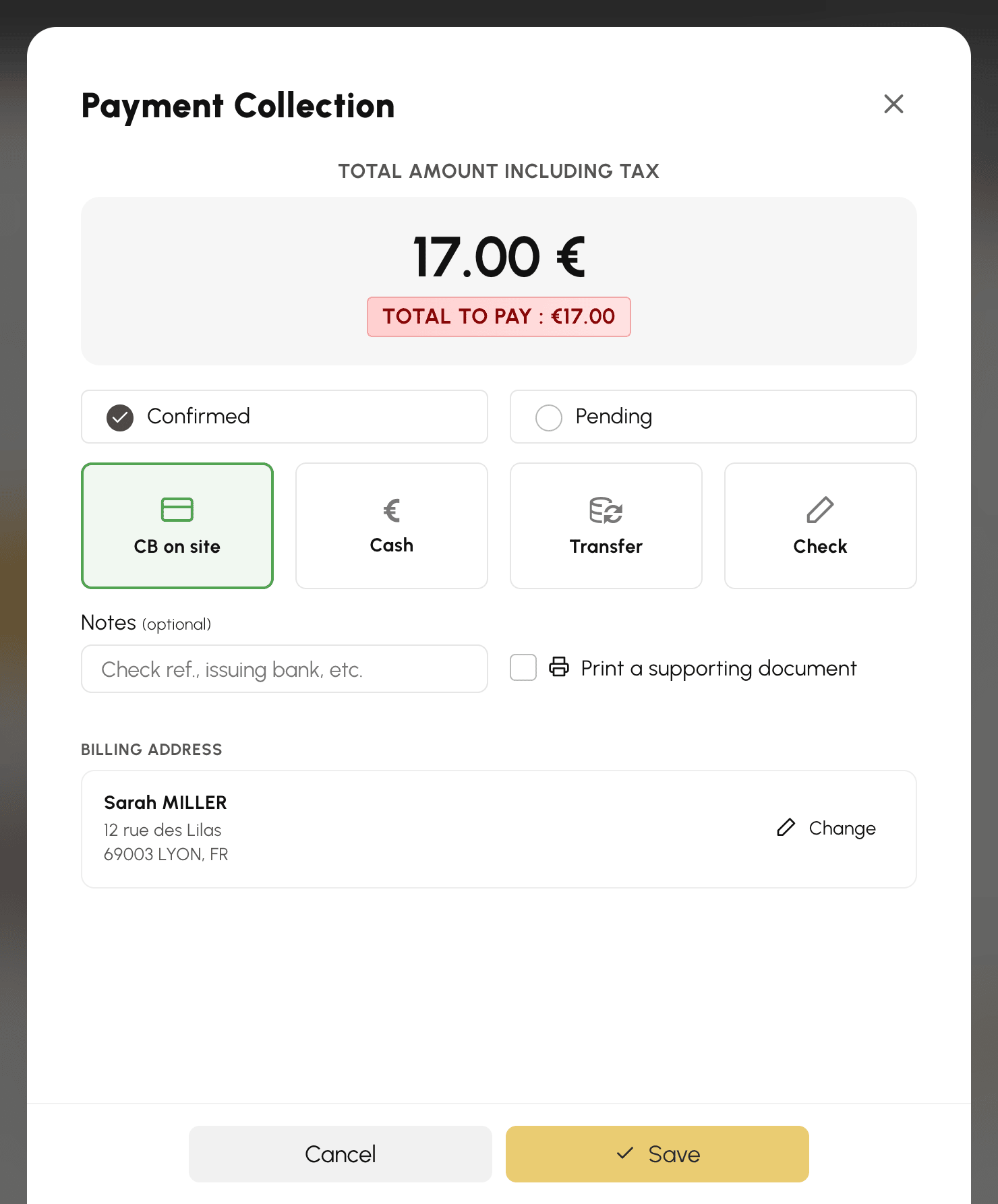
Izbor adrese za fakturisanje klijenta
Kada je prodaja povezana sa korisnikom, prozor za naplatu prikazuje njegov Adresa za fakturisanje, na početku onaj podrazumevani. Dugme Promeni otvara listu njegovih adresa u samom prozoru: kliknite na željenu adresu ili kreirajte novu pomoću Nova adresa. Možete i ispraviti ili obrisati adresu, isto kao što bi to korisnik uradio sa svog naloga.
Već uneti način plaćanja i napomene se čuvaju. Dok je formular neke adrese otvoren, njegova dugmad Povratak i Sačuvaj zauzimaju mesto dugmadi za plaćanje: ona čuvaju adresu, nikada prodaju.
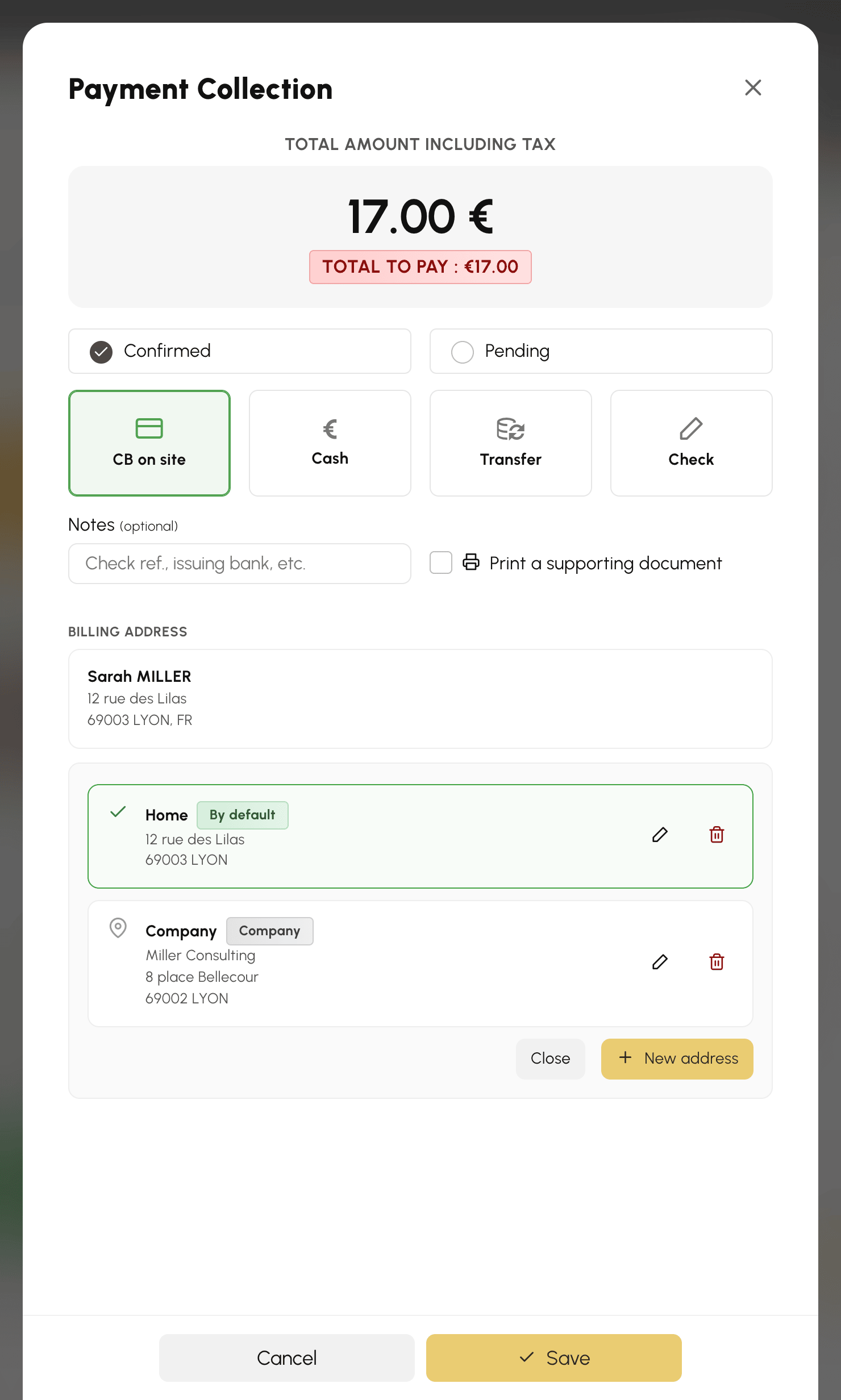
Kreirane ili izmenjene adrese odmah se dodaju na nalog korisnika. Izabrana adresa se, međutim, primenjuje na prodaju tek onog trenutka kada je potvrdite.
Naplata preko POS terminala
Ako je POS terminal povezan sa vašim nalogom za fakturisanje, izbor CB na licu mesta prikazuje red Terminali, sa već izabranim terminalom: u uobičajenom slučaju ne morate da uradite ništa više osim da potvrdite. Pločica Ručni unos ostaje dostupna za evidentiranje plaćanja karticom koje je naplaćeno na drugi način.
Čim je terminal izabran, status se zaključava na Potvrđeno i datum se fiksira — plaćanje potvrđuje terminal, a ne vi. Dugme postaje Nastavi: ono šalje iznos na uređaj, gde klijent prislanja svoju karticu.

Tokom naplate korpa ostaje zaključana: naplaćujete tačno ono što je klijent video.
Pronalaženje prodaje na pultu
Prodaje sa kase ulaze u praćenje porudžbina kao i sve ostale. Potražite ih po imenu kupca ako je uneto, ili po periodu ako je prodaja anonimna. Povraćaj sredstava, slanje fakture e-poštom i računovodstveni izvozi funkcionišu na isti način.
