



Charging for bookings
Charge credits for every booking: your users top up their account in advance, or pay directly when they book. Here is how to set your prices, sell credits and track bookings awaiting payment.
Understanding the two ways to pay
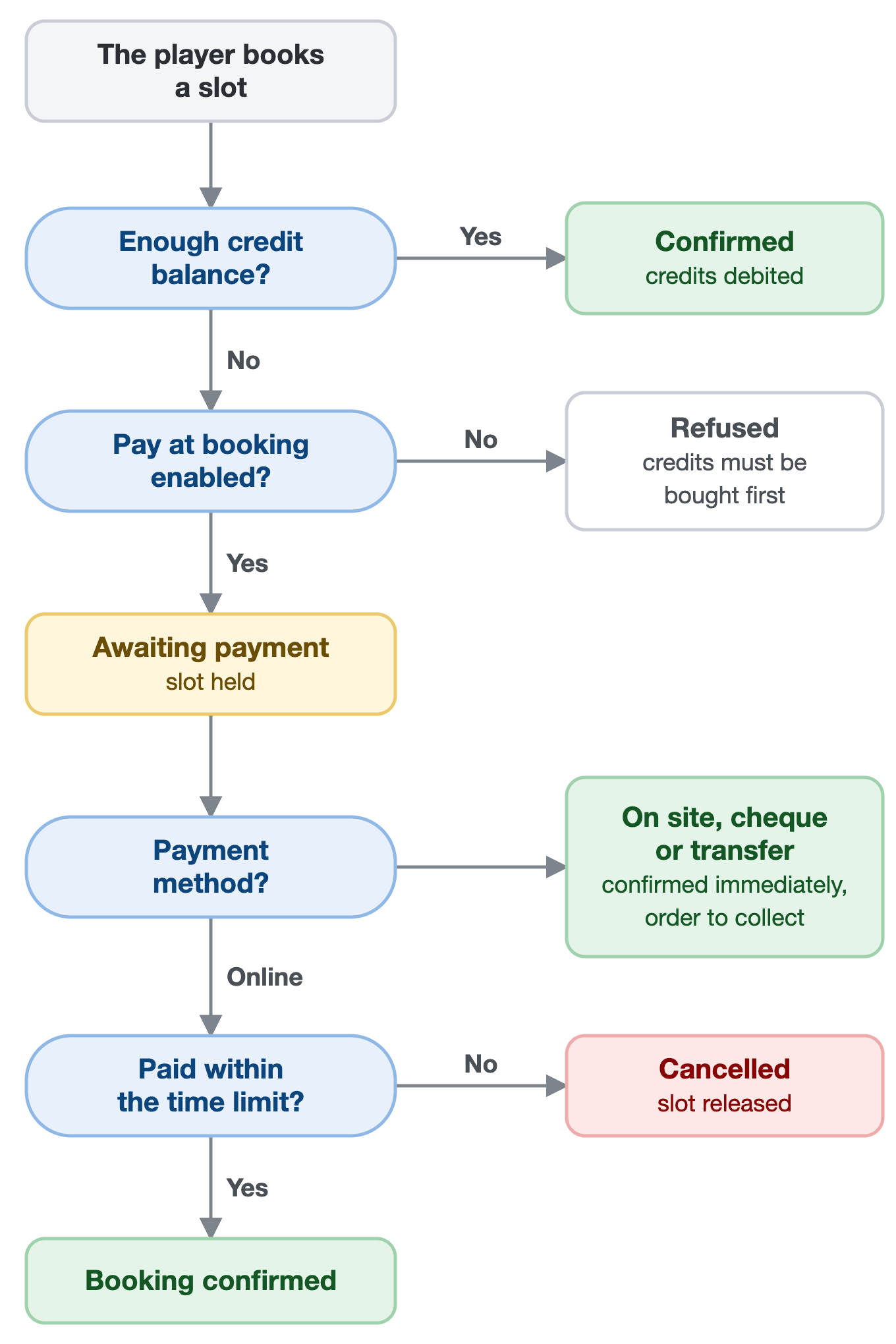
Every booking costs a certain number of credits, debited from the player's account. To have credits, the player has two options:
- Top up their account in advance: they buy credits online, then book as many times as their balance allows.
- Pay when booking, if you enable this option: if they do not have enough credits, they pay the shortfall directly from the form, or the whole booking if they have none at all.
Both ways of paying coexist: each player chooses the one that suits them. The diagram below sums up what happens when a player books.
Enabling credit sales
Credit sales are configured in the subscription record, not in the product catalogue.
- Go to Administration›Users›Access Rights›Subscriptions and open the subscription concerned.
- Open the Credits tab and enable Activate the credit system.
- In the Payments & Billing section, enable online sales.
- Set the Unit Price, then your offers in the Quantity Pricing section (see below).

The matching product is created automatically and then appears in Administration›Settings›Billing›Products & Services. Without online sales, the credit system remains usable: you then credit accounts manually from each user's record, after a payment at the club.
Building your credit offers
In the Quantity Pricing section, each line links a quantity of credits to a price including tax. The Add a quantity-based rate button adds as many as you need, and the user chooses at purchase. The Free Quantity option also lets them choose the quantity they want, at the unit price. If one credit is worth €1, which we recommend (see below), each offer reads as a top-up, and the discount is immediately visible:
| Quantity | Price | Discount |
|---|---|---|
| 20 credits | €20 | none |
| 50 credits | €48 | 4% |
| 100 credits | €90 | 10% |
| 200 credits | €170 | 15% |
You decide the gap between the tiers. A discount that is too small will not trigger bulk purchases, while a discount that is too large subsidises heavy users at the expense of occasional ones.

Setting the price of bookings
The price of a booking is set under Booking Rates, in the Credits tab of the subscription. With 1 credit = €1, you enter euros directly, and you can vary them by calendar, by day or by time: cheaper off-peak hours, more expensive indoor courts, a weekend rate.

The Duration of a Booking Credit setting then says how this price is counted:
- X credit(s) = X minutes, the recommended configuration for more flexibility: the price is set for a duration, for example €12 for 60 minutes, and debited in proportion to the duration booked. A 90-minute booking costs €18. The price stays fair when your time slots have unequal durations, or when you let users choose their own time.
- X credit(s) = 1 booking: the price is debited once per booking, whatever its duration, for example €12. Easy to understand, but one hour and three hours cost the same.
- X credit(s) = 1 time slot: the price is debited for each time slot occupied. At €12 per time slot, a booking of three consecutive time slots costs €36.
If you have chosen 1 credit = €1, finally enable Display credits in currency: the balance, the cost of the booking and the amount left to pay are shown in euros rather than as a number of credits, which is what your players actually have in mind. Do not enable this option if a credit is worth a different amount: the sums displayed would be wrong.

Charging for guests
When a player books with someone from outside the organization, a guest, you can charge for that invitation. Guest credits work like booking credits, with their own balance, and are used only for inviting. They are configured in the Guest Passes tab of the subscription:
- Enable Allow booking with guests.
- Under Guest Pricing, set the price of an invitation by calendar, day and time.
- Under Payments & Billing, enable online sales of guest credits and build your offers, as for booking credits.
The price is counted per guest: a booking with two guests costs twice the price of an invitation. When the player is accompanied by partners, the Charge only the person responsible for the reservation option decides who pays for the guests: the person who made the booking alone, or each partner for their share.
Using a single balance for everything
Two separate balances often make life complicated for players. With the Unified credit system option, in the Guest Passes tab, invitations are paid for with booking credits: the player then has only one balance, which they top up in one go and which is used both for booking and for inviting.
Invitation prices remain those of the Guest Passes tab: only the balance used changes. With 1 credit = €1, this is the simplest configuration for your players: a single top-up, prices in euros, and an amount left to pay that includes guests when they pay at the time of booking.
Offering payment at booking
With payment at booking, a player who does not have enough credits is not blocked: they pay the shortfall when booking, at the price of your credit offers. Their time slot is held for the duration of the payment.
- Go to Administration›Users›Access Rights›Subscriptions and open the subscription concerned.
- In the General tab, enable Payment on booking.
- Set the time allowed for the player to pay, between 5 and 30 minutes.
- Save the subscription.
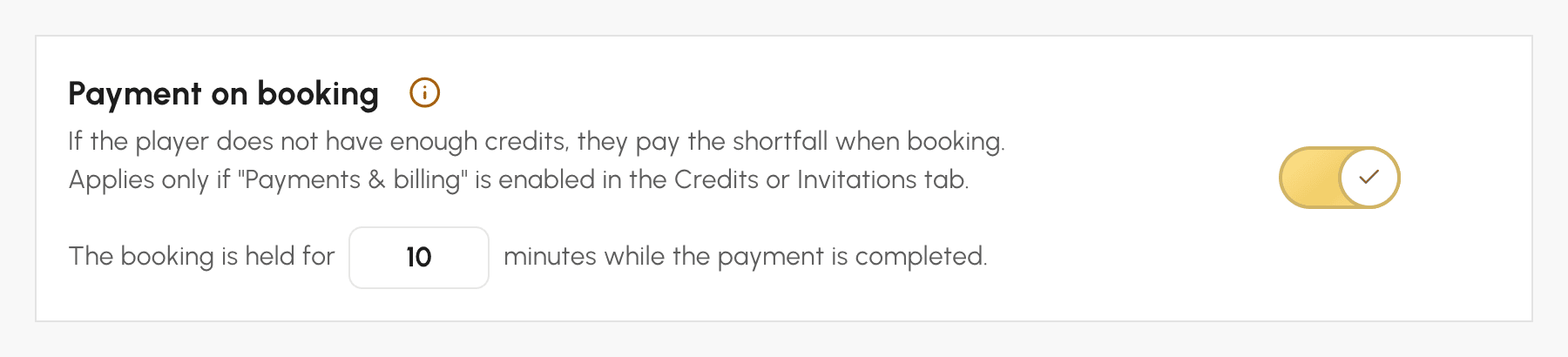
The option is enabled by default, with a time limit of 10 minutes. It works if credit sales are enabled under Payments & Billing, in the Credits or Guest Passes tab, and if your billing account accepts online payment, or payment at the club, by cheque or by bank transfer with the Deliver ordered products & services immediately option.
Understanding the time limit by payment method
On the payment page, the player chooses from the payment methods of your billing account:
- Online payment: the player has the time set (10 minutes by default) to confirm their payment. As soon as the payment is received, the booking is confirmed. Without payment by the deadline, it is cancelled and the time slot released.
- Payment at the club, by cheque or by bank transfer: the booking is confirmed as soon as the player chooses this method. A pending order is created in their name: you collect payment when they arrive at the club, or when the transfer is received.
The time limit therefore only serves to choose a payment method: a booking confirmed by a payment at the club is never released while waiting for the player.
Tracking bookings awaiting payment
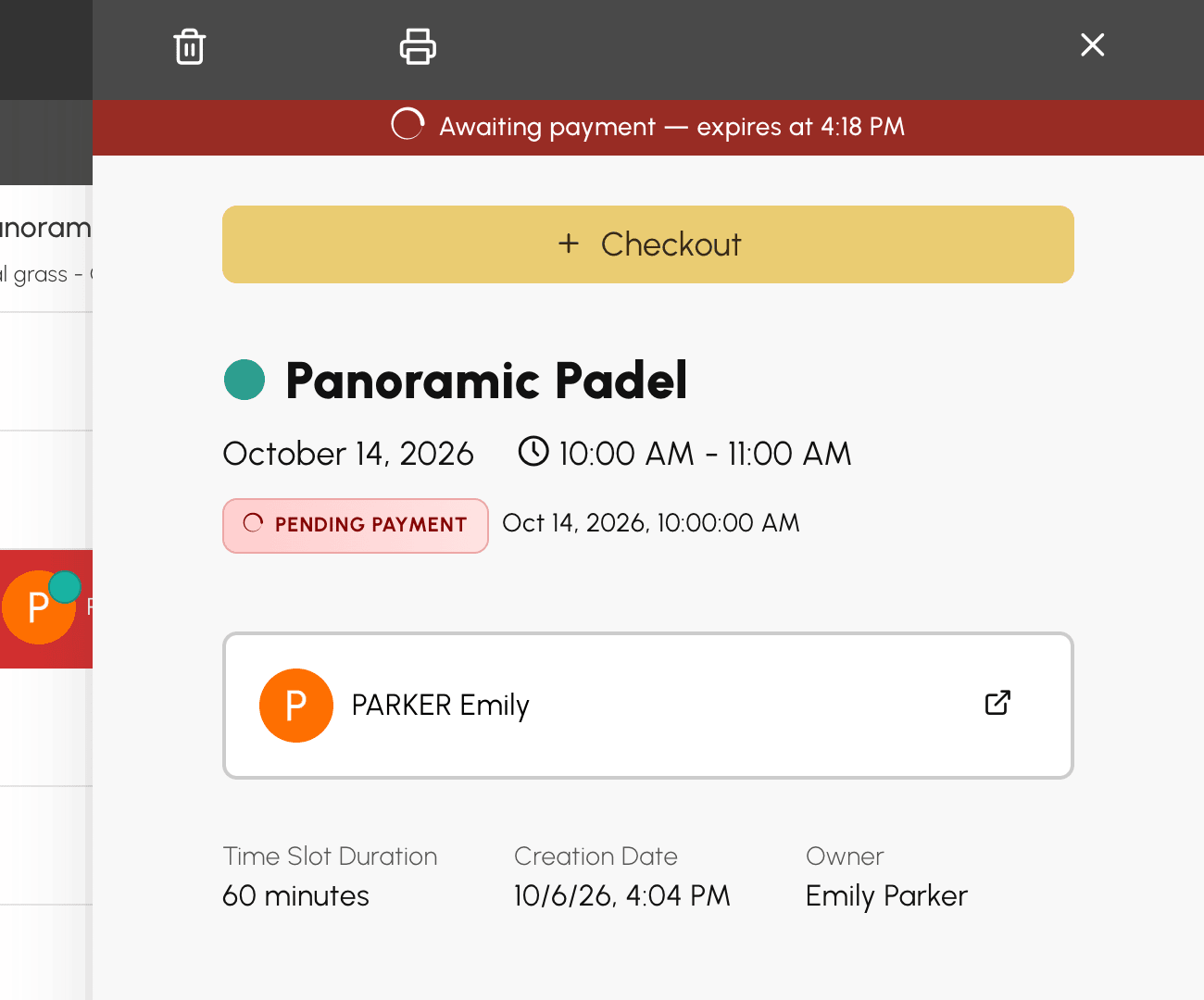
A pending booking already takes up the time slot. In the calendars, you can recognise it by the icon, and its panel shows the payment deadline.
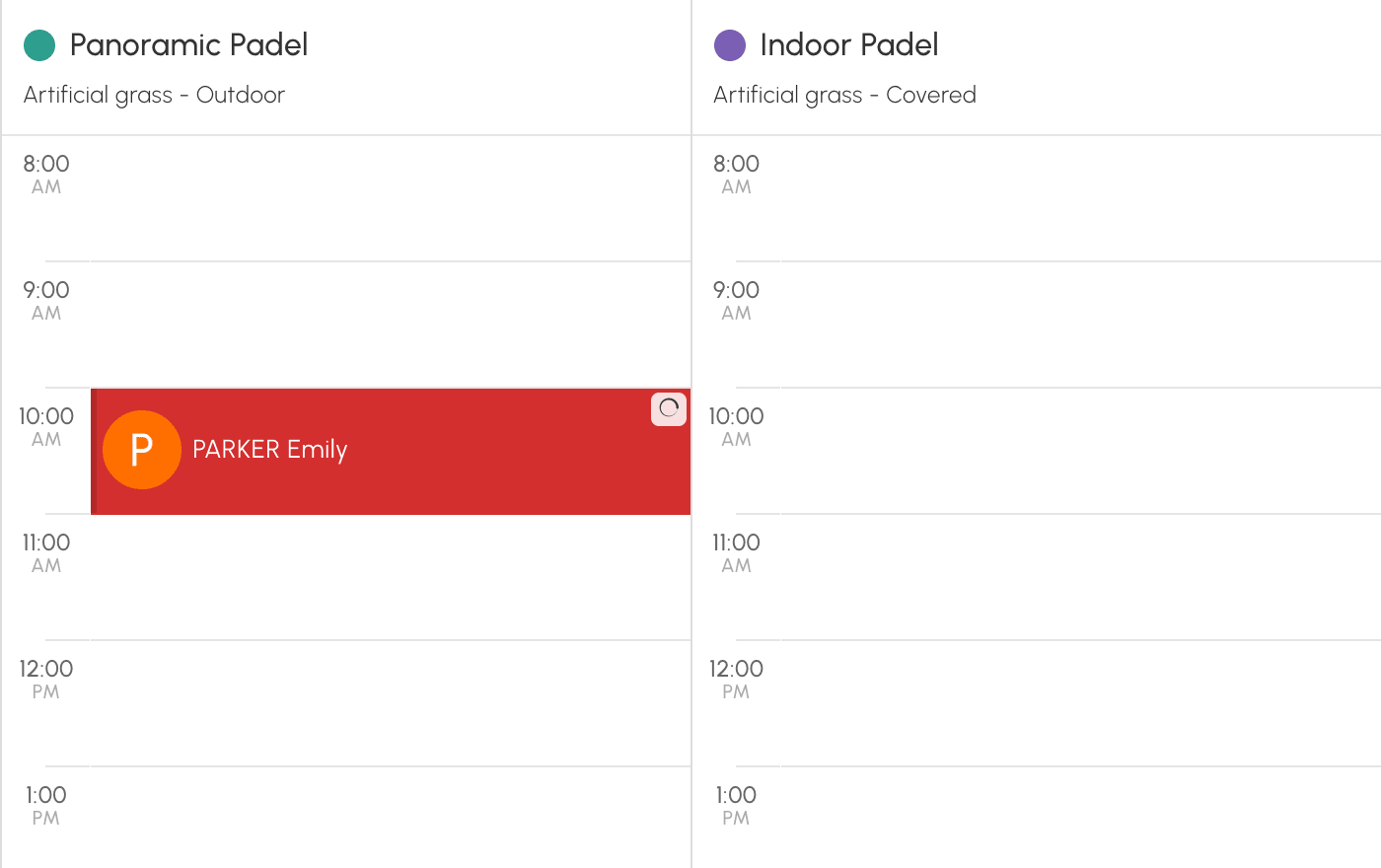
As long as it is pending, it cannot be modified or moved: it is either paid for or cancelled. Confirmation e-mails, reminders and access codes are only sent once the payment has been received.
From its panel, you can:
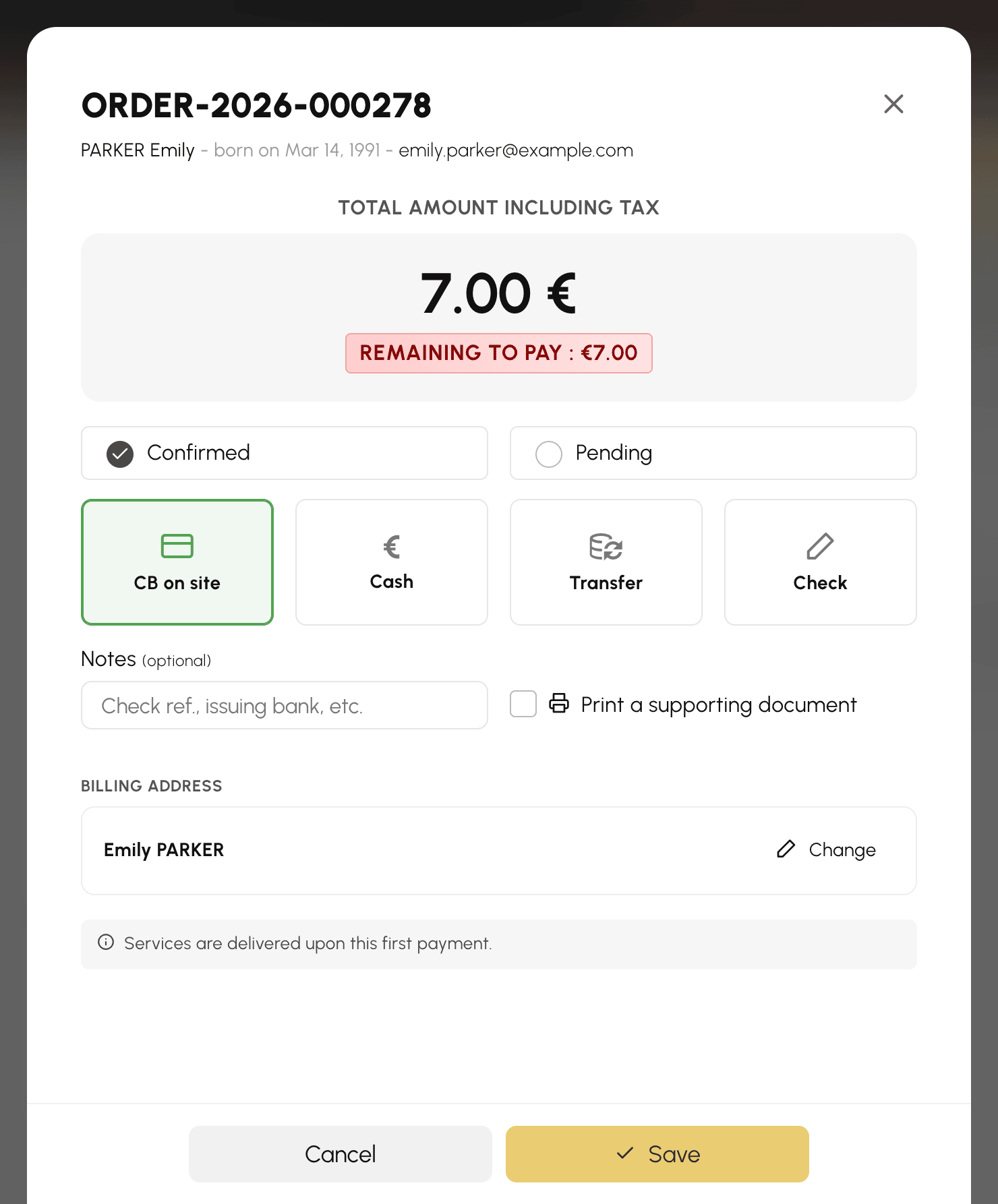
- click Checkout to record a payment received at the club, if you have access to billing: the booking is confirmed;
- cancel it with Cancel: the time slot is freed up, the order is cancelled and any credits already debited are returned to the player.
When the deadline passes without payment, the booking is cancelled automatically and any credits already debited are returned to the player. A payment may still go through after the deadline, for example an online payment that was already under way, or a payment you collect on the order within the following hour:
- if the time slot is still free, the booking is reinstated;
- otherwise, the credits purchased remain on the player's account, and they are informed by e-mail.
Giving credits for free
Selling is not the only use. Several settings credit an account at no charge:
- Add credits when creating the subscriber's account: every new subscriber starts with a balance, enough to try before buying.
- Online registration can credit the account as soon as the request is approved.
- The automatic birthday message can accompany its wishes with a gift in credits.
- From a user's record, you adjust a balance manually, with a note that will remain in their history.
Sharing the same price list between several subscriptions
If several subscriptions sell credits on strictly identical terms (same unit price, same offers, same instalments), a single product is created and shared. Your catalogue stays readable instead of filling up with duplicates.
Sharing exposes you to no side effects: modifying the price list of a subscription that shares its product automatically creates a copy attached to it alone. The other subscriptions keep their prices.
Disabling sales on a subscription simply detaches it from the product; the product remains available as long as another subscription uses it.
Tracking sales and balances
Credit purchases appear in invoices and transactions like any other order. On the user's side, every movement (purchase, booking, cancellation, manual adjustment) is recorded in the history of their record.
