



Share the cost of bookings
A parent who pays for their children's games, a coach who books for their students, a user who treats a friend to a game: choose, subscription by subscription, who pays for a booking with several players. Then see what is credited back when the booking changes.
Understand who pays for a booking
In a booking paid with credits, each participant has a share: their place and, if the booking includes guests, the guest passes counted against them. Without any specific setting, each participant pays their share with their own credits, at their subscription's rate.
Take one hour of padel at €12 per place (1 credit is worth €1), booked by Nicolas with Léa:
| Nicolas's subscription | Nicolas pays | Léa pays |
|---|---|---|
| Each participant pays for their own spot | €12 | €12, according to her own subscription |
| Charge only the booking organizer | €12 | nothing |
| Nicolas is allowed to pay for his partners and pays Léa's place | €24 | nothing |
The booking owner is the subscriber who makes the booking, the one whose name appears first on the time slot.
Choose who pays for the booking
- Go to Administration›Users›Access Rights›Subscriptions and open the subscription.
- In the Credits tab, with Activate the credit system enabled, make your choice in the Who pays for the booking? section.
- Save.
Have only the owner pay
With Charge only the booking organizer, the subscriber who makes the booking pays the price of one place, and the other participants pay nothing. This setting also exempts the subscriber when they play as another player's partner: they pay nothing on another subscriber's booking.
This is the setting for a Coach Subscription: the coach books a court for their three students and pays €12, the price of their place. Their students play without spending any credits. The club then only collects one place for the court.
Let everyone pay for their own place, or for others'
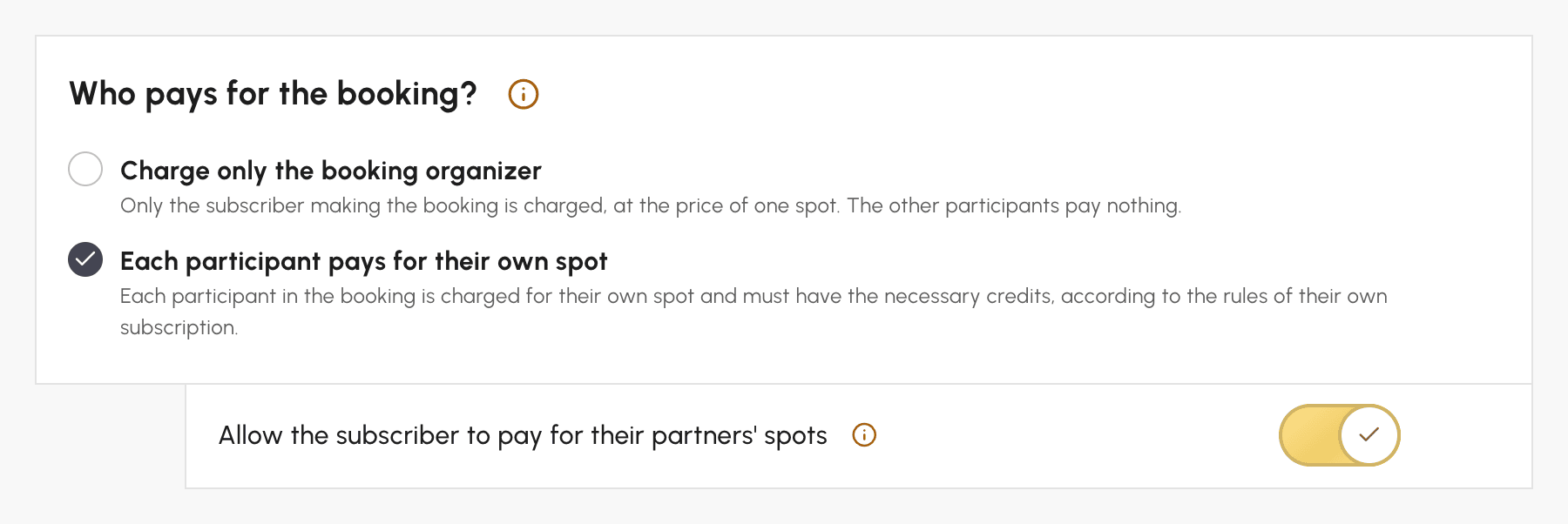
With Each participant pays for their own spot, each participant on the booking is charged for their place, according to the rules of their own subscription. A participant who does not have enough credits prevents the booking.
The Allow the subscriber to pay for their partners' spots option, under this choice, lets the subscriber who makes the booking pay, if they wish, for the place of one or more partners. This is the setting for a Family Subscription: Claire books a court for herself and her son Hugo. She chooses to pay for his place, and her credits cover both places, i.e. €24. Hugo's balance does not change. Another time, Claire can let Hugo pay for his own place, or pay for a partner who has run out of credits so the game does not have to be cancelled.
It is the payer's subscription that must have the option: Claire can pay for Hugo as soon as her own subscription allows it, and Hugo's subscription does not need the option. The place paid for a partner is still charged at the price set by that partner's subscription, which may differ from the payer's.
Choose who pays for guest passes
Guests, who are outside your organization, are paid for with guest credits, or with booking credits in Unified credit system. In the Guest Passes tab, the Who pays for guest passes? section offers the same choices, with one difference to be aware of.
Nicolas and Léa play with a guest, at €5 per guest pass:
- with Charge only the booking organizer, Nicolas pays €5 and Léa pays nothing;
- with Each participant pays for the guest passes, each participant on the booking is charged for all the guest passes of the booking: Nicolas pays €5 and Léa also pays €5. The guest pass is counted once per participant, not split between them.
So, to have a guest pass paid only once, choose Charge only the booking organizer. Under the second choice, Allow the subscriber to pay for their partners' guest passes allows Nicolas to also pay for Léa's guest passes: he then pays €10, and Léa pays nothing.
When Nicolas is the only one paying for guest passes, his guest can also pay their share themselves, online: this is the Have guests pay via link option, in the same section.
Know what the subscriber sees when booking
When a subscriber whose subscription allows them to pay for their partners' places or guest passes books with a partner, they find three choices in the Booking Cost box of the form: Split, I'll pay for all to pay the shares of all the partners their subscription allows them to pay for, or Custom, with a I'll pay switch under each partner.
If a partner does not have enough credits, the subscriber can click Pay for their spot instead of removing them from the booking. With payment at booking, their Remaining to pay includes what they pay for their partners: Nicolas, who only has €5 in credits and pays for both places, has €19 to pay.
The confirmation e-mail tells each participant who paid for their place, and the credit history keeps the mention "paid for …" or "paid by …".
Book for users and choose who pays
When you book yourself for several users, you decide freely who pays, regardless of the options of their subscriptions. A parent calls you to book a court for their two children and pay for everything: select them as the payer for each child.
- In the booking form, select the users in the Users tab.
- In the Booking Cost box, choose Custom.
- Under each participant, choose in the Who pays? list who pays their share: the participant themselves, or another participant in the booking.
- Confirm the booking.
The selected participant pays the place and, if any, the guest passes of the person they are paying for. Show details expands each participant's balance before you confirm. The choice does not appear with Do not count credits, nor when no participant has credits to pay.
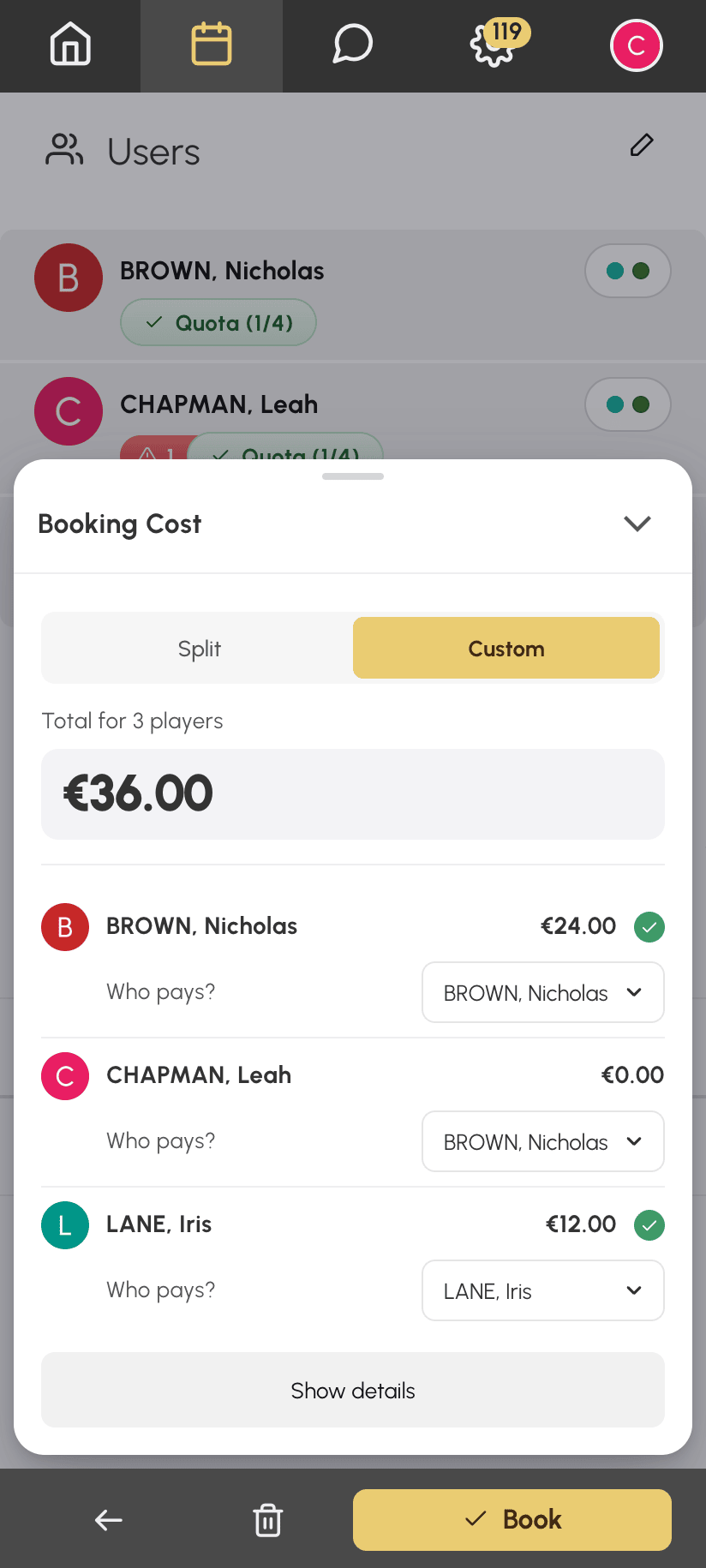
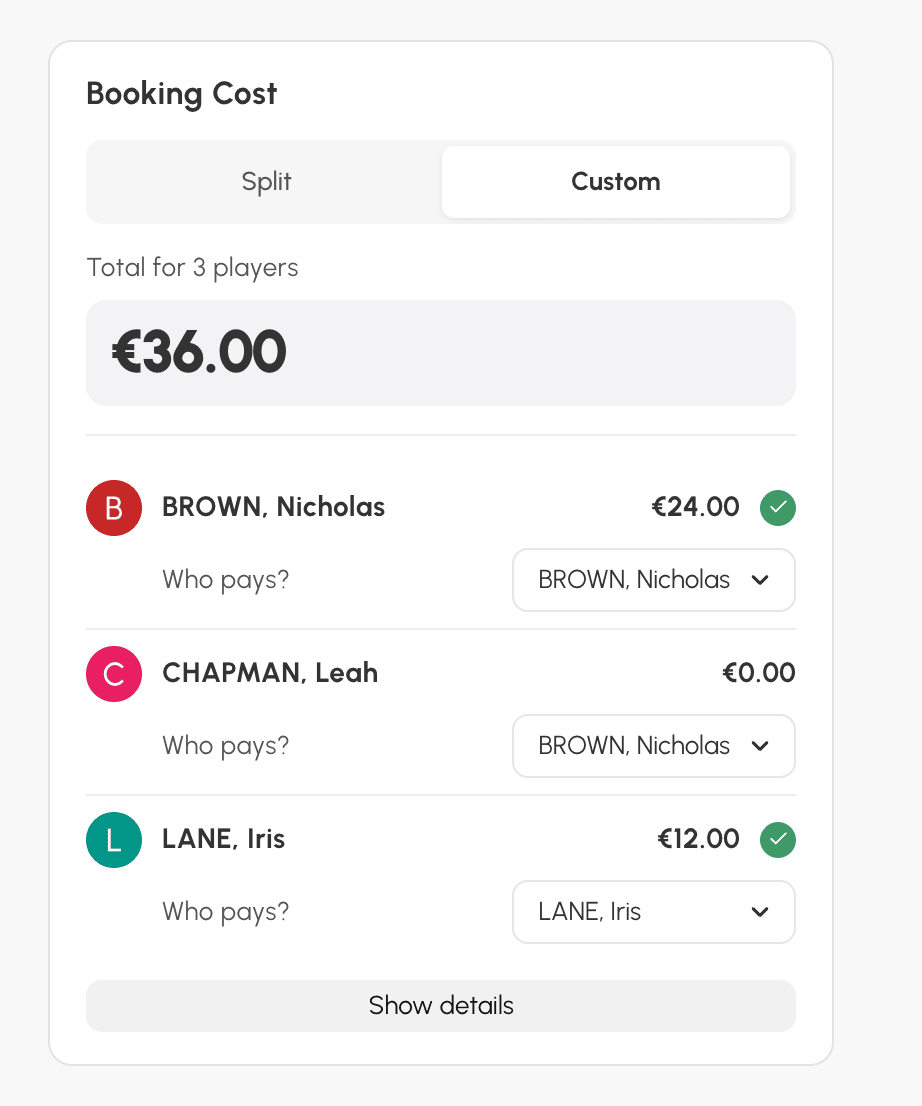
In the example below, Nicolas also pays for Léa's place, and Inès pays for her own: Nicolas is charged €24 out of a total of €36.
On mobile: the box opens as a panel from the bottom of the screen.
On a computer: the box is in the left column of the form.
If your profile does not have Enable Restrictions, the selected participant is charged even if they do not have enough credits: their balance can become negative.
Pay for a participant who joins a booking
Léa drops out and Inès replaces her. Nicolas had paid for Léa's place: who pays for Inès's? In the booking details, click the icon next to Léa, or Add a participant for an additional participant. Then choose Inès.
A Who pays? list appears under her name. It offers Inès herself, then the other participants in the booking whose subscription allows them to pay for their partners. Unlike the booking form, it therefore follows the subscription options. When Léa is replaced, Nicolas is suggested by default, since he was paying for her place, as long as his subscription still has the option.
Before you save, the window shows what each person will pay or get back: Inès's share, who pays it, and the credits returned for Léa. If this calculation fails, Amounts unavailable is displayed, but you can still save.
This choice is only offered when a single participant joins, without a guest, a booking that deducts credits, excluding participatory bookings. Users, for their part, see a I'll pay switch when their own subscription has the option.
Understand what is credited back to participants
Whatever was paid for a booking is credited back to the person who paid it, for the amount paid, even if the participant's rate or subscription has changed since. The Do not refund credits in case of cancellation option, with its deadline, still applies. Let's go back to Nicolas, who paid for Léa's place.
- If the booking is cancelled, Nicolas gets back the €24 for both places. If Léa's subscription does not credit anything back on cancellation, Nicolas only gets back his own place: the subscription of the participant he paid for decides.
- If Nicolas is replaced, he gets back the €12 paid for Léa, and Léa pays for her place with her own credits. If she does not have enough left, the replacement is refused, unless it is made by a club manager whose profile does not have Enable Restrictions: Léa's balance can then become negative. Nicolas cannot withdraw himself either as long as Léa cannot take over her place.
- If the booking runs from 6 pm to 8 pm, Léa cannot leave only the second hour: her withdrawal applies to the whole duration, and Nicolas gets back everything he paid for her.
- If the booking is moved and costs more or less at its new time, Nicolas pays or gets back the difference for Léa's place, without ever getting back more than he paid.
Read the payment summary
A user asks why they were not credited back? At the bottom of a booking's details, even a cancelled one, the Payment summary answers without any calculation: what each participant paid, and by whom. After a cancellation, each amount is marked Refunded or Not refunded. Participants who left along the way remain visible under Withdrawals and replacements, and the Total section summarises what each payer paid when it provides useful information.
The summary never shows a user's balance. It is visible to the booking's participants, to the person who created it, and to club managers whose profile allows them to book for other users, overwrite bookings, or view the booking and guest pass dashboards.
