



Have guests pay by link
A user books with a friend from outside the organization. Instead of paying for the guest pass, the user can let the friend pay their own share online, without creating an account. This page explains how to enable payment by link, where the money goes and how to track these payments.
Understand payment by link
When booking, the booking owner (the user making the booking) chooses who pays for each guest's place. The owner can pay as usual, or the guest can pay by link. If the owner entered the guest's e-mail address, the link is sent by e-mail. Otherwise, the owner shares it from the booking details. The guest pays on a page branded with your organization's colours and receives their invoice.
The owner has two options:
- "later": the booking is confirmed immediately and the owner advances the guest pass with their credits. The guest can pay up to 7 days after the end of the time slot. Once the guest pays, the advanced credits are returned to the owner;
- "now": the booking waits for the guest's payment during the payment at booking deadline, then it is confirmed. If the guest does not pay in time, the booking is cancelled and the time slot is released.
Nicolas books a padel court with his friend Paul, whose guest pass costs €8. With "later", Nicolas advances the €8 for the guest pass with his credits, and gets them back as credits once Paul has paid. With "now", Paul's share is not charged to Nicolas: the booking waits for Paul's €8, and the credits deducted from Nicolas during the wait are returned to him as soon as the booking is confirmed.
Enable payment by link
This setting is configured for each subscription. It is enabled by default: your subscribers see the option as soon as the conditions below are met.
- Go to Administration›Users›Access Rights›Subscriptions and open the subscription.
- In the Guest Passes tab, under Who pays for guest passes?, enable or disable Have guests pay via link.
- Save.
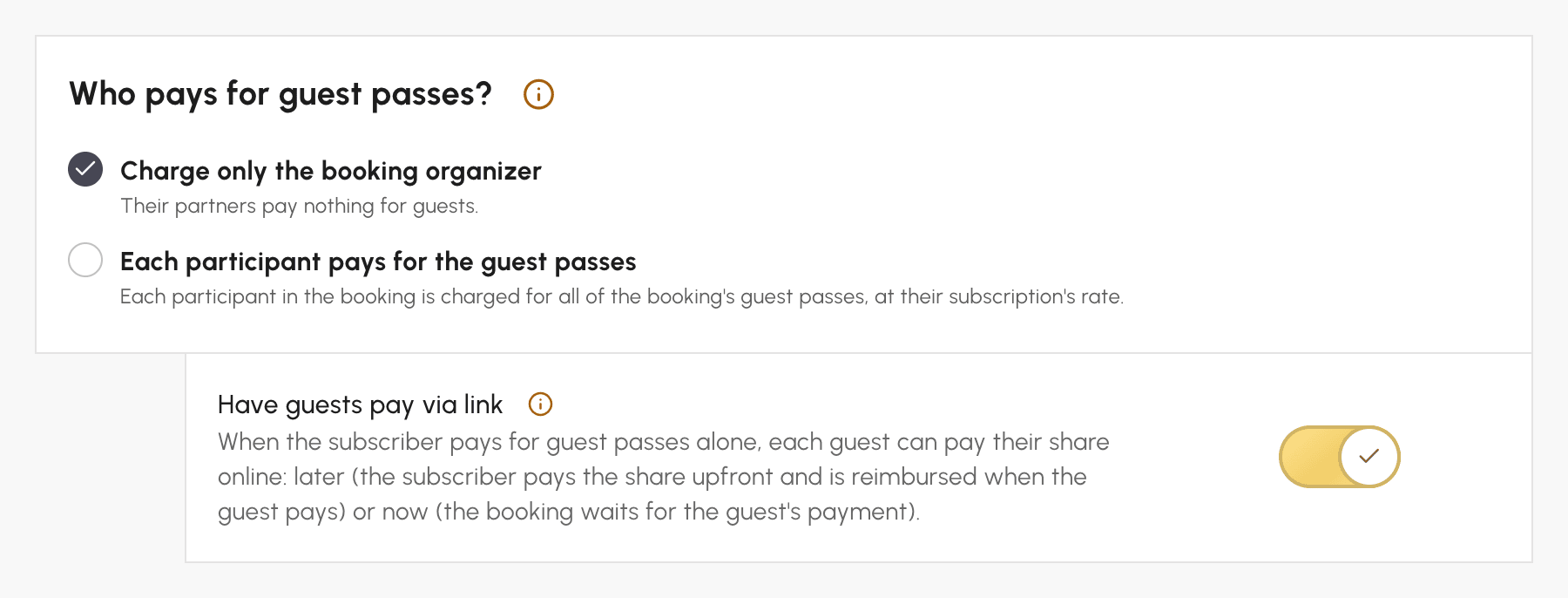
The option is only offered to the user if:
- your organization accepts online payments: the subscription's billing account offers online payment. Otherwise, the option is greyed out and a Set up online payment link takes you to the billing accounts;
- the subscription sells its guest credits online (its booking credits with Unified credit system): this price sets the guest's share;
- the owner is the only one paying for guest passes. This is always the case with Charge only the booking organizer. With Each participant pays for the guest passes, this is only the case if the owner plays with their guests only, without any partner from the organization;
- the owner has not chosen to pay for their partners' guest passes;
- the booking is not recurring;
- the guest's share reaches the minimum for an online payment: €0.50 with Stripe, €1 with other online payment methods. Below this amount, only payment by the owner is offered for this guest.
"Now" also requires Payment on booking, enabled in the Credits or Guest Passes tab: the booking waits for the guest's payment during the deadline set for this payment.
The link is never offered when you book on behalf of a user, from a kiosk or on a participatory time slot.
To stop offering payment by link, disable the option. No new links are created, and links already sent can still be paid until their deadline.
Know what the guest pays and where the money goes
The guest's share is the price, in money, of the credits their guest pass costs, at the rate at which the owner's subscription sells its guest credits (its booking credits with Unified credit system). It is set at the time of booking and never changes. If the booking is later moved or extended and costs more credits, the extra amount is charged to the owner. The payment deadline, however, follows the booking.
Each paying guest has their own order, in the name of your organization's Walk-in customer, even if they have an account with you. The order contains a Guest share line with the calendar, the date and the time, and the payment is collected on the billing account of the owner's subscription. The guest receives their invoice by e-mail and can download it from their payment page. To find their order, search for their name or e-mail address in Administration›Dashboard›Billing›Invoices & Transactions.
The money paid by the guest goes to your organization, never to the owner. The owner only gets back what they advanced, always as credits, even if they paid for these credits by card when booking.
Collect a payment on site, by cheque or by bank transfer
If the billing account accepts payment on site, by cheque or by bank transfer, a guest paying "later" can choose one of these methods on their payment page. They then receive a purchase order with the payment instructions. This only indicates how they intend to pay: their share is only settled once you record the payment, and they can still pay online until then. "Now" only offers online payment.
- Open the booking details.
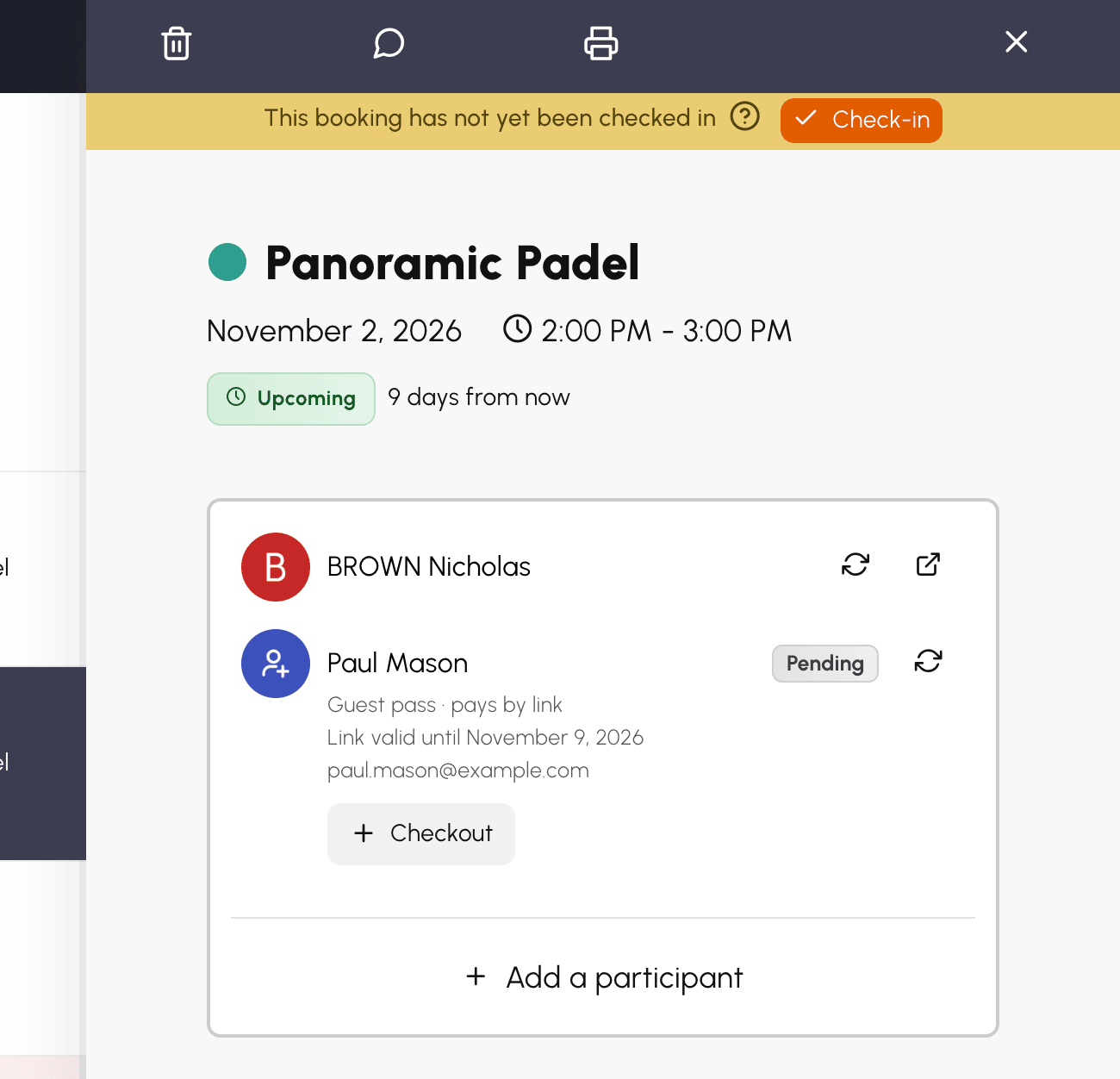
- Under the guest's line, click Checkout: their order opens.
- Record the payment received, as for any other order.
Once the order is fully paid, the guest's share is settled and the advanced credits are returned to the owner. If the guest indicated a payment on site, by cheque or by bank transfer and you receive it after the deadline, record it the same way. The guest can no longer pay online, but the amount collected is returned to the owner as credits.
Refund a guest
When a booking is cancelled after a guest has paid, their share follows the outcome of the guest pass the owner advanced:
- if this guest pass is returned to the owner, for example for a cancellation within the deadline or a cancellation made by your organization, the guest is refunded;
- if it is not returned, because the subscription does not credit back guest passes for a late cancellation, your organization also keeps the guest's share.
Removing or replacing all guests from a booking that goes ahead also refunds the guest who paid, even outside the deadline.
The refund method depends on the guest's payment method. If they paid online with Stripe, HelloAsso or SumUp, they are refunded automatically within minutes, with a credit note. If they paid another way (on site, by cheque, by bank transfer or with another online payment method), they are not refunded directly: the amount is returned to the owner as credits.
When cancelling, the confirmation message tells the person cancelling, for each guest who paid, whether the guest will be refunded or whether their share goes back to the owner as credits. The cancellation e-mail received by the owner confirms this. Nothing is shown when your organization keeps the share.
If an automatic refund could not be confirmed, the booking details show a warning linking to the order. Open the order and check the refund in your payment provider's account. A refund you make yourself from the order does not affect the owner: the credits they got back or advanced remain unchanged.
Track guest payments
In the booking details, each guest has their own line: who pays for their place, the payment deadline and a Pending badge until they have paid. You can also see their e-mail address. The booking's participants can see whether the guest has paid, but not their address.
Copying the link, displaying the QR code, sending the e-mail, taking over the guest's share (I'll pay after all) or replacing a single guest are reserved for the booking owner. However, you can replace all guests with the icon on the guests line. Before saving, a confirmation reminds you which links will be cancelled and which shares will be refunded.
While a guest has a pending payment link or has paid by link, the owner cannot be removed or replaced in a booking that goes ahead. Remove the guests first, or cancel the booking. No automatic reminder is sent to guests: it is up to the owner to resend the link if needed.
Converting a subscription to Wallet mode is refused while a guest has not paid their share of a booking that has already started. Try again after their deadline, 7 days after the end of the booking.
