



Cash register
Sell at the counter without going through the creation of an order: build your customer's cart using touch tiles, then take their payment. Go to the Administration›Dashboard›Billing›Cash Register menu.
Knowing when to use the cash register
The cash register is not reserved for immediate payments: it is simply another way to create a sale, more direct than the order form. You build a cart in a few taps, and the status you give the payment decides what becomes of the sale.
- Confirmed payment: the sale is settled on the spot and becomes an invoice. This is the counter scenario — a tube of balls, a drink, a booklet of credits.
- Pending payment: nothing is collected for now, the sale remains awaiting payment. You have just produced a purchase order, which the customer will settle later by bank transfer or on their next visit.
Many managers find the cash register more intuitive than the sales menu for creating an order, even without collecting payment: the products are right there, as tiles, rather than in a form.
That is the right way to see the two screens: the cash register is fast and covers the essentials, sales tracking offers every setting. Nothing stops you from starting with one and finishing with the other.
Building the cart
The catalogue is displayed as tiles. Each click adds the item to the Cart, a second click increases the quantity.

Several tabs help you find an item quickly: All, Favorites, Popular — the best sellers — and Miscellaneous, supplemented by your catalogue categories. The Search field remains the fastest option as soon as the catalogue grows.
The tiles show the remaining Stock when the product tracks one, and the wording Break when it is out of stock.
Selling something that is not in the catalogue
The Custom button creates a line on the fly: a Label, an Total Amount Including Tax and a VAT rate. If the item comes up regularly, create it once and for all in the catalogue instead: the Manage Products shortcut takes you straight there, and you will also gain sales tracking per product.
Attaching the sale to someone
By default, the sale is recorded in the name of the Walk-in customer. That is the right choice for a visitor buying a drink.

Attach it to a user as soon as the nature of the purchase calls for it, and it is essential in two cases:
- a sale of credits, which must credit a specific account to be usable;
- a subscription, which only makes sense when attached to a person — the Choose a plan button then selects the desired plan.
The Detach button goes back to the walk-in customer if you selected the wrong person.
Entering the details of a walk-in customer
When taking payment, you can enter the customer's identity and address without creating an account for them: last name, first name, address, and the Company Address block with the Company Name, the Organization ID and the VAT number for a sale to a company.
These details are frozen on the sale. They are used to produce an invoice in the customer's name, and they make the sale findable: the order tracking search queries these fields, without which every counter sale would look alike.
Applying a discount
Two options, directly in the cart:
- the Promo code, which applies an already defined promotional offer;
- the Manual Discount, as a Percentage or a Amount, decided case by case.
The total takes the discount into account immediately, but note the wording "estimated discount, revalidated at checkout": a code that has expired or whose usage cap has been reached will be set aside when you confirm, and the actual amount will be shown to you before you validate.

Collecting the payment
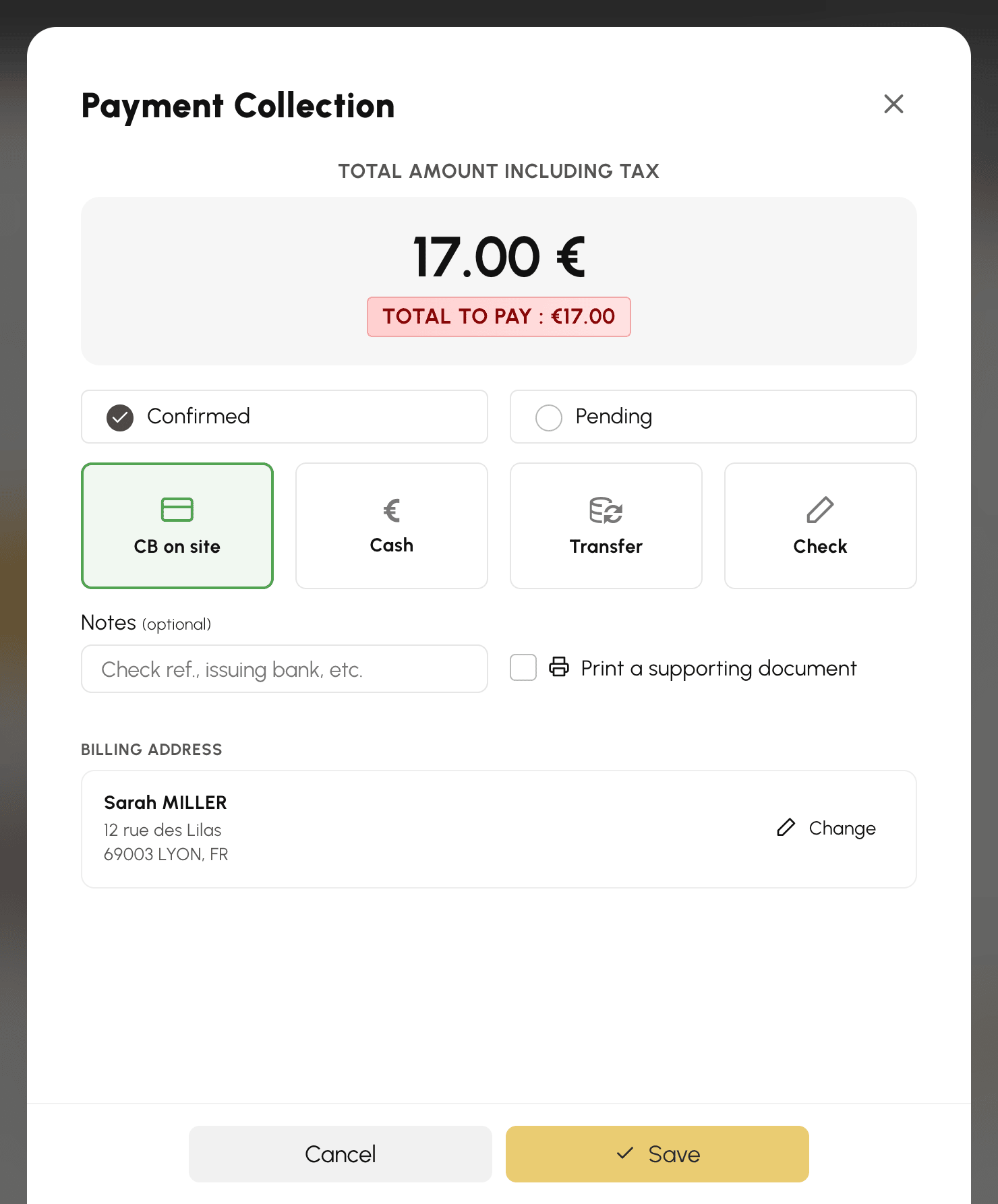
- Click Checkout: the cart is frozen and the payment window opens with the amount to collect.
- Choose the payment method: CB on site, Cash, Transfer or Check.
- Choose the payment status: Confirmed if the money has been received (invoice), Pending if payment will come later (order).
- Confirm: the order is created, the payment recorded, and the cart emptied for the next customer. The order then opens in a side panel, ready to be completed if needed.
Choosing the customer's billing address
When the sale is attached to a user, the payment window shows their Billing Address, the default one to begin with. The Change button unfolds the list of their addresses within the window itself: click the address you want, or create one with New address. You can also correct or delete an address, just as the user would from their account.
The payment method and notes already entered are kept. As long as an address form is open, its Back and Save buttons take the place of the payment ones: they save the address, never the sale.
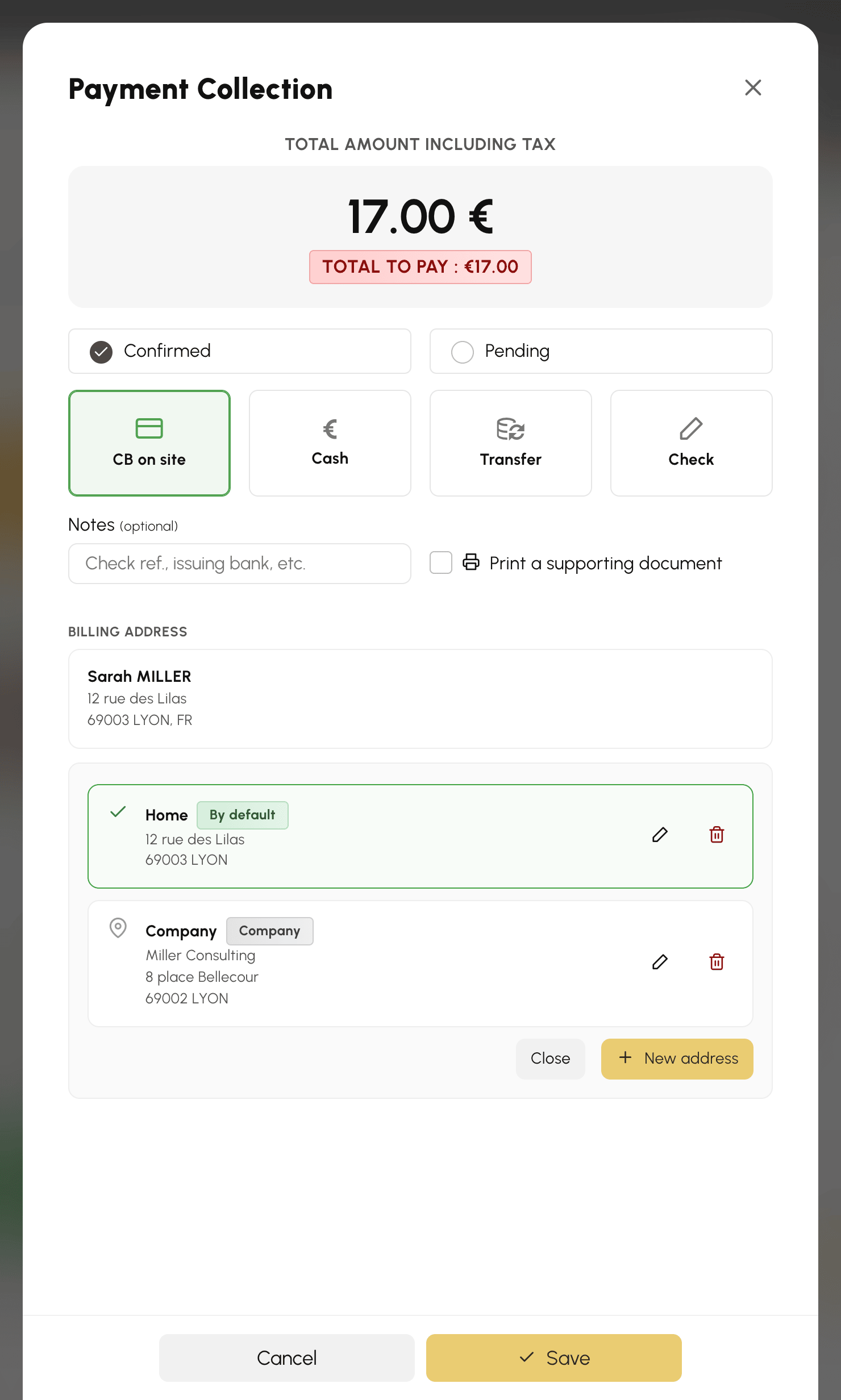
Addresses created or modified are added to the user's account immediately. The address you choose, however, only applies to the sale once you confirm it.
Collecting payment on the POS terminal
If a POS terminal is attached to your billing account, choosing CB on site displays the Terminals line, with your terminal already selected: in the usual case, you have nothing more to do than confirm. The Manual Entry tile remains available for recording a card payment collected another way.
As soon as a terminal is selected, the status is locked on Confirmed and the date is frozen — it is the terminal that will confirm the payment, not you. The button becomes Continue: it sends the amount to the device, where the customer presents their card.

During payment collection, the cart stays frozen: what you collect is exactly what the customer saw.
Finding a counter sale
Cash register sales join order tracking like all the others. Search for them by the customer's name if it was entered, or by period if the sale is anonymous. Refunds, sending the invoice by e-mail and accounting exports work in exactly the same way.
