


Spartime: secure your access points offline, with temporary codes and QR Codes
Spartime has been designing access solutions since 2002 and replaces keys and badges with personalised temporary access. Its distinctive feature: FacilitAcces® door controllers work without an Internet connection at the equipped site.
Overview
Spartime Innovations has been designing and developing access solutions since 2002, and today manages more than one million entries per year. Its promise: replace keys and badges with temporary, personalised and secure access, without anyone having to travel to open a door.
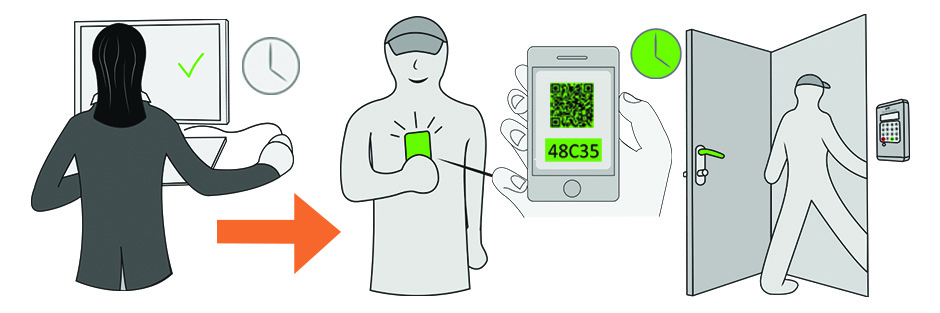
Its distinctive feature lies in the autonomy of its FacilitAcces® door controllers. Where other solutions need a permanent link between the Organization and the equipment, Spartime calculates Persocode® codes valid within a given time range, and the door controller checks them by itself. No Internet connection is required at the equipped site.
What the solution brings day to day
- No more keyrings to manage: the right to enter is created and withdrawn automatically, simply by reading the code.
- A lightweight installation, with no network cabling or Internet configuration on site.
- Fully remote administration, from your Organization account and from the Spartime platform.
- Each Booking generates a different code, and events are stored in the door controller, with alert options available.
- Compatible door controllers also accept QR codes, which are handy to send to an occasional Player.
- The same installation can control the Court's lighting and heating, in addition to its door.
Opening the Player's whole route
A single Booking can open several successive passages: the main gate, the club house, the changing rooms, then the Court door. The Player enters a single code and follows the route through to the Court, without having to remember one combination per door.
Each of these access points is set up according to one of two approaches: a fixed time range — for example Monday to Friday from 8 a.m. to 10 p.m. — or an opening conditional on a Booking in progress.
A door controller can also control a safe or a locker, so equipment can be made available with the same code as the Booking.
Uses that go beyond the Organization
An isolated Court, a site with no network, or an installation where running a link would be costly: this is where the door controller's autonomy makes the difference.
The same equipment is found in sports halls and associations as well as in offices, coworking spaces, car parks and facilities managed by a local authority. It is an argument worth considering if your Organization manages several types of space with a single tool.
Connecting your Spartime account
- Open Administration›Settings›Access Control & Piloting, then More Information on the Spartime card.
- Enable the module.
- Enter your Spartime ID and your Spartime Password, then click Login.
The Gateway Status block confirms the link. These credentials are provided by Spartime: they are not those of your Organization account.

Declaring your door controllers
A door controller corresponds to a physical access point: a Court door, a changing room, an entrance gate. From Door Entry System Configuration, click New Gatekeeper.
- Tick Doorman Activated.
- Give it a self-explanatory Access Name, for example "Court no. 1 - South door" or "Changing rooms".
- Choose the Calendar / Access Type: this is what links the door controller to the Bookings for a given Court.
- Tick With QR Code if your door controller is compatible.
- Fill in the technical settings supplied by Spartime for this equipment.
Opening several doors with a single code
A Player who books a Court often has to go through several doors: the gate, then the changing room, then the Court. Rather than giving them three codes, designate a Main Gatekeeper and attach Secondary Gatekeepers (optional) to it.
The code issued at the time of Booking then opens the whole route.
Checking before opening to the public
The Status & Test Codes tab of a door controller lets you check the installation before handing it over to Players: generate a code and test it on site.
Test both families of codes offered by the solution, the Time Codes tied to a time range and the Instant Codes, before announcing the new arrangement to your Users.
Controlling lighting and heating
The same installation can control the Court's lighting and heating, in addition to its door.
Activation is linked to the Access code: the light comes on when a Player listed on the Booking enters their code. Nothing is triggered if nobody turns up, which avoids lighting a Court that a Player booked and then forgot — on late-in-the-day Time Slots, this is where most of the savings are made.
Contact
Spartime Innovations studies each installation before proposing a configuration, and provides online Support for its door controllers.
- Website: spartime.com
- E-mail: contact@spartime.com
- Telephone: 02 51 11 02 40, or +33 2 51 11 02 40 from abroad
- Address: Le Carré de Couëron, 5 rue des Vignerons, 44220 Couëron, France
