It is now possible to synchronize your personal calendar with your bookings. Whether you use Apple Calendar, Google Calendar, Outlook, or another compatible application, this new feature allows you to find your bookings in the agenda you already check every day.
To use this new feature, go to Booking > My Bookings, then click on the My Calendar button.
From this window, two options are offered:
(1) Copy link
(2) Open in my calendar
This button allows you to directly open the subscription link in the default calendar application installed on your device. It's a convenient solution to start synchronization with one click, without having to copy and paste the link manually.
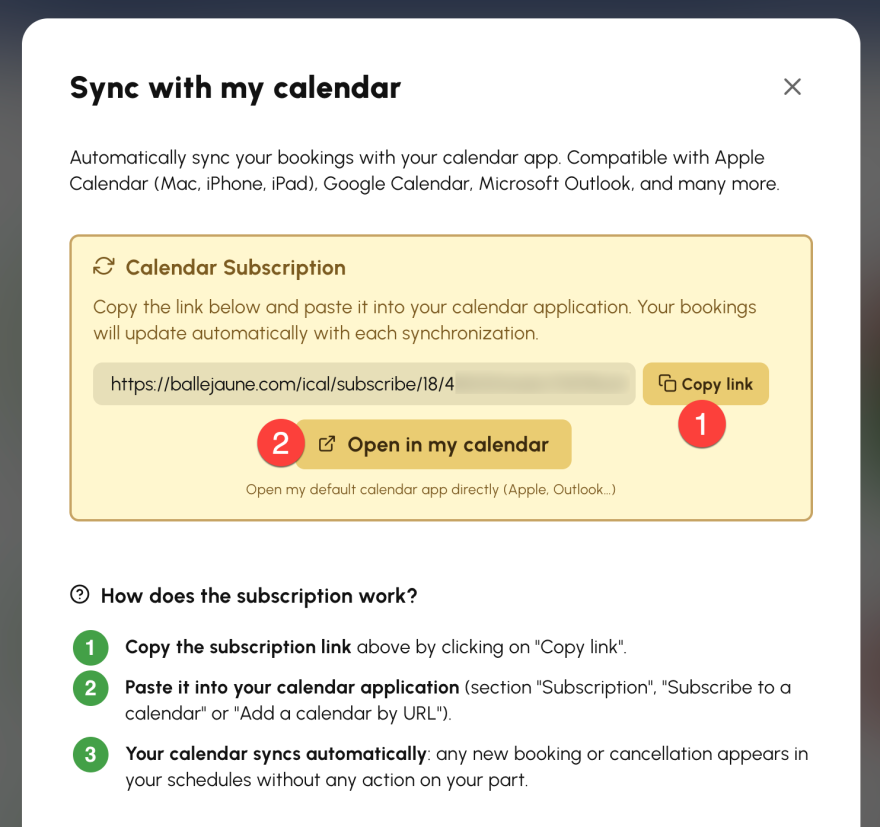
The operation is based on a subscription link to your booking calendar. Once the subscription is added, synchronization is automatic. Each new booking or cancellation is then reflected in your personal calendar, without additional handling.
This way, you always keep an up-to-date agenda, with ease.
The OpenResa team at your service!